Skip to content

The Machine · Recipes

Looping Brush Drum

Design stage

Updated 2026-10-20

A piece of push broom sweeps a snare drum in loops, the way a drummer plays brushes. One motor and two belts draw the loops, so the swish swells on every beat, and a servo lifts the broom off to stop it.

Loading the model

Drag to turn · scroll to zoom

Printed

3DWhere we started. This is one version of it. A 14 inch snare, an 80-tooth pulley in the middle and a 20-tooth pulley on an 88 mm arm, and a piece of soft push broom 40 mm off the small pulley's axis. The gray line on the head is the path the middle of the broom follows. Press Play to see it at real speed, one turn a bar at 120 beats a minute. The broom lands on a beat, sweeps, taps once and lifts off. Printed parts are drawn in orange; everything else is bought.

Overview

Cost, roughly
About $320
Printing
About 9 hours
Building
A weekend
Difficulty
Moderate

Anatomy

1
Energy source
A stepper motor turning an arm round the middle of the drum
2
Control
The arm's speed and phase, locked to the beat, and a servo that lifts the broom on and off the head
3
Sounding body
A snare drum with a coated head and its snares on
4
Reset
None needed; the broom keeps sweeping until it's lifted
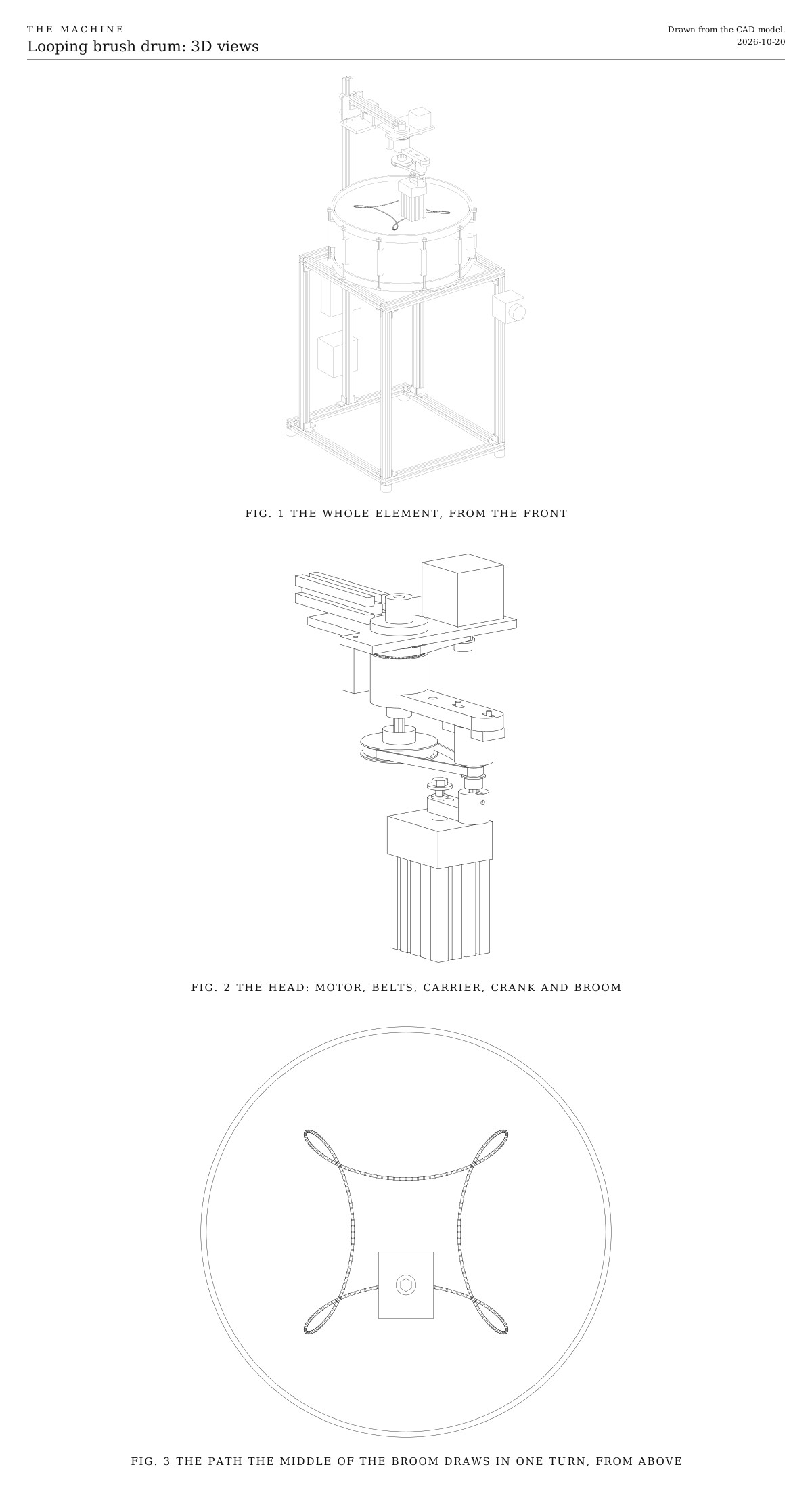
3D views. The whole element from the front, the head up close with the motor, both belts, the carrier, the crank and the broom, and the path the middle of the broom draws in one turn, seen from above. Drawn from the CAD model.
Fig. 13D views. The whole element from the front, the head up close with the motor, both belts, the carrier, the crank and the broom, and the path the middle of the broom draws in one turn, seen from above. Drawn from the CAD model.

How it works

  • A snare drum sits on a low frame of aluminum extrusion with its snares on. Over its middle hangs a head that rides up and down a mast at the back on wheels.
  • The broom sweeps in loops. A stepper turns an arm round a rod in the middle of the drum. On the rod, under the arm, is a pulley that never turns. A belt runs from it to a small pulley at the arm’s tip, so as the arm goes round, the small pulley spins the other way, three times for every turn of the arm. A short crank under the small pulley carries a piece of push broom. The broom draws four loops a turn, like a spirograph.
  • The swish swells and fades. The broom moves fast across the middle of the drum and slowly round the tip of each loop. Faster is louder, so at one turn a bar the swish swells on every beat. At 120 beats a minute the broom moves between about 0.1 and 0.65 meters a second.
  • The broom presses with its own weight. It hangs loose on a pin in the crank. With the head down, the broom rests on the drum and the pin floats a few millimeters up, so the drag is the same wherever the broom is. Washers on the pin make it heavier and louder.
  • A servo starts and stops it. The head rests on a rubber bumper. To stop the swish, the servo’s horn pushes the head up 18 mm, which lifts the broom clear. Letting the head back down starts the swish again, on the beat. Lifting it a little and letting it drop gives a soft tap.
  • It plays on the beat. A Hall sensor sees a magnet in the arm once a turn, so the program knows where the broom is in its loops. It sets the arm’s speed from the tempo and lines up the swells with the beats while the broom is lifted, then lets it down.
  • The pattern is in the parts. The pulleys set how many lobes there are, and the hole in the crank sets their shape. Change them to change the pattern.
  • An ESP32 listens for the wireless signal and drives the stepper and the servo. It runs from the shared power-tool battery.

Safety

  • The belts and pulleys can catch fingers and hair while the arm turns. Keep hands out of the head while it runs, and press the stop button before reaching in.
  • The head drops onto its bumper when the power is cut. Keep fingers out from under the arm.
  • The arm turns slowly, about 30 turns a minute, and the broom is light, so there’s no need for a guard. Watch for loose sleeves near the belts all the same.

Notes

  • This is a first design, drawn but not yet built. Expect one round of fitting.
  • The swish of a broom is quiet. The hand test in the Assembly tab is there to find out how quiet before you build.
  • The gray line on the 3D model’s drum head is the path the middle of the broom follows in one turn of the arm. The broom covers a wider band, about its own width.
  • Costs in the parts list are rough estimates for budgeting, not checked prices. They add up the version we started with.
  • The firmware in the downloads is a first version. It compiles, and its timing is tested against a simulated carrier and servo, but it hasn’t yet run on a built element. It listens for Control, the one broadcast signal every element hears, and until there’s a bridge to send it, its bench console plays the notes to its own beat.

Parts

Ingredients

KindPartQtySourceEachFile
PrintedMotor plate, bolts under the arm and holds the motor, the fixed rod and the Hall sensor1··STL
PrintedCarrier, turns round the fixed rod with the printed belt ring on top and the arm at the bottom1··STL
PrintedSmall pulley's block, holds its shaft on two bearings under the arm1··STL
PrintedCrank, clamps the small pulley's shaft and holds the broom's pin1··STL
PrintedServo bracket, a shelf on the mast that carries the servo and the bumper1··STL
BoughtCoated batter head, 14 inchYour choice: see The drumA Remo Coated Ambassador or similar, unless the drum already has a good coated head.1·$15.00
BoughtSoft push broom, synthetic, with split tipsYour choice: see The broomOne broom gives several pieces, so you have spares.1·$15.00
BoughtM6 x 60 bolt, partly threaded, with an M6 threaded insert for wood, a locknut and a few washersThe bolt is the broom's pin. Its head and washers rest on the crank, and the washers are the broom's weight.1·$3.00
BoughtFlanged bronze bushing, 6 mm bore, 8 mm outside1·$1.00
BoughtNEMA 17 stepper motor, 40 mm body, 5 mm shaft1·$12.00
BoughtTMC2209 stepper driver1·$6.00
BoughtElectrolytic capacitor, 100 µF, 35 VAcross the stepper driver's motor supply, to soak up the spikes the motor sends back.1·$1.00
BoughtGT2 pulley, 20 teeth, 5 mm bore, for 6 mm beltOn the motor.1·$2.00
BoughtGT2 closed belt, 200 mm, 6 mm wideThe drive belt, from the motor to the carrier's ring.1·$2.00
BoughtSHF8 flange shaft support, for 8 mm rod1·$3.00
BoughtSteel rod, 8 mm, 200 mm longCut into a 119 mm fixed rod and a 71 mm shaft for the small pulley.1·$4.00
Bought608 ball bearings4·$1.00
BoughtShaft collars for 8 mm rod, with 8 mm shim washersOne holds the carrier up on the fixed rod, one hangs the small pulley's shaft from its top bearing. The shims keep each collar off the bearing's outer ring.2·$1.00
BoughtGT2 pulley, 80 teeth, 8 mm bore, for 6 mm beltYour choice: see The patternThe one in the middle that never turns. It clamps to the fixed rod.1·$7.00
BoughtGT2 pulley, 20 teeth, 8 mm bore, for 6 mm beltYour choice: see The pattern1·$2.00
BoughtGT2 closed belt, 280 mm, 6 mm wideYour choice: see The patternThe loop belt, from the fixed pulley to the small one.1·$2.00
BoughtHall sensor, A3144, the bare three-legged part, and a 6 x 3 mm magnetNot a sensor board with its own pull-up resistor; see the Wiring tab.1·$1.00
BoughtV-slot mini gantry plate for 20 mm extrusion, with four mini V-wheels, spacers and two eccentric spacersThe wheels ride in the mast's side slots, so the whole head can lift.1·$15.00
BoughtMG996R servo, standard, with its horns1·$10.00
Bought623 ball bearing, with an M3 x 12 screw and nut, for the roller on the servo's horn1·$1.00
BoughtRubber bumper, 10 mm, with an M5 studThe head rests on it whenever it's down.1·$1.00
Bought6 V converter, 5 A, and a 1000 µF 16 V capacitorThe servo's own supply.1·$6.00
BoughtAluminum extrusion, 20 x 20 mm V-slot, 390 mm, for the front and back of the top square and the bottom frame4·$3.00
BoughtAluminum extrusion, 20 x 20 mm V-slot, 350 mm, for the sides of the top square2·$3.00
BoughtAluminum extrusion, 20 x 20 mm V-slot, 410 mm, for the sides of the bottom frame2·$3.00
BoughtAluminum extrusion, 20 x 20 mm V-slot, 485 mm, for the legs4·$4.00
BoughtAluminum extrusion, 20 x 20 mm V-slot, 950 mm, for the mast1·$7.00
BoughtAluminum extrusion, 20 x 20 mm V-slot, 198 mm for the arm and 40 mm for the stub, the arm's end tapped M51·$3.00
BoughtCorner brackets for 20 mm V-slot, with screws and T-nuts24·$1.00
BoughtFeet for 20 mm V-slot, rubber or levelling4·$2.00
BoughtRubber strip, 3 mm, self-adhesive, about 40 cmFour 80 mm pieces on the top square, where the drum's bottom hoop rests.1·$3.00
BoughtESP32-S3 development board1·$6.00
BoughtBattery adapter for the shared power-tool platform, and a 5 V buck converterThe motor and the servo run from the battery, through the fuse, the stop button and the relay. The ESP32 and the Hall sensor take 5 V.1·$15.00
BoughtThe listener parts every element carries, as on the Control pageA blade fuse holder and a 3 A fuse, a latching stop button with a spare contact, the status light, the number switches and their resistors. The stop switch under Choices has a plain two-pole switch in place of the stop button.1Link$12.00
BoughtMomentary push button, normally open, for the test buttonA short press plays each note once, and a long press relearns what the element can by itself. Any small panel button that closes while it's pressed will do.1·$1.00
BoughtRelay module, 5 V, high-level trigger, contacts rated 10 AThe switch the motor's and the servo's power goes through. A relay, not the MOSFET module the Control page also allows, because a MOSFET module switches the ground side, which would leave the stepper driver grounded only through the ESP32.1·$2.00
BoughtResistor, 10 kΩHolds the relay off while the ESP32 starts.1·$0.10
BoughtProject box, big enough for the ESP32, the driver and two convertersYour choice: see The electronics1·$8.00
BoughtWire, 18 and 22 AWG, stranded, and a small terminal block1·$8.00
BoughtM5 screws, T-nuts and washers, M4 screws and heat-set inserts, M3 screws, nuts and a set screw, assortedTwo M4 x 12 screws and inserts for the block, an M3 x 8 set screw and nut for the crank, M3 self-tapping screws for the servo, an M5 x 12 screw into the arm's tapped end.1·$10.00
SalvagedSnare drum, 14 inch, usedYour choice: see The drumAny make, with working snares and a throw-off lever.1·$60.00
Total$322.10

Tools

  • 3D printer, PETG
  • Hex keys, 1.5, 2, 2.5, 3 and 4 mm
  • A drum key, to fit the head and tune
  • A fine-toothed saw, for the broom head
  • A drill with 6 and 10 mm bits, for the broom's pin and its insert
  • A soldering iron, for the wiring and the heat-set inserts
  • A multimeter, to set the converters
  • A hacksaw and a file, for the steel rod

Choices

Decisions that are yours to make. Where we started is the version in the 3D model and the ingredients: a starting point, not the right answer.

How the broom moves

What carries the broom over the head?

Loops from one motorWhere we started

SoundFour swells a turn, one on every beat, with a slow curl round each tip

One stepper, two bought pulleys and two belts. The pulleys and the crank's hole fix the pattern. A second motor added later makes it programmable without rebuilding anything else.

Any path, two motors

SoundWhatever the program draws, such as spirals, roses, figure eights or slow sweeps from side to side

The same head, with a second stepper turning the middle pulley instead of holding it still. Both motors stay put, so no wires reach anything that turns. It takes a second driver and more firmware.

A plain circle

SoundOne steady hiss, the same all the way round

Leave out the loop belt and fix the crank to the arm. The simplest version, and a good test rig.

The drum turns instead

SoundA steady hiss, or rosettes if the broom also slides in and out

A lazy-susan bearing under the snare, and the broom on a still arm, which makes lifting and tapping easy. The drum's weight makes speed changes slow, and nobody can see the pattern being drawn.

Whatever moves it, the swish is loudest where the broom moves fastest.

The pattern

How many lobes a turn, and what shape?

Four lobes, curling at the tipsWhere we started

SoundAt one turn a bar, a swell on every beat, and a soft curl between them

An 80-tooth pulley in the middle and a 20-tooth pulley on the arm, with the broom in the crank's 40 mm hole.

Four lobes, sharp points

SoundThe broom stops dead at each tip and sets off the other way, which adds a small scrape between swells

The same pulleys, with the broom in the crank's 30 mm hole. The stop and start is harder on the bristles.

Three lobes

SoundThree swells a turn against four beats, a lopsided three against four

A 60-tooth pulley in the middle and a shorter loop belt, 256 or 260 mm. The arm's slots take either.

Five lobes

SoundFive swells a turn, a rolling five against four

A 16-tooth pulley on the arm, and the same 280 mm belt with the block moved out to near the end of its slots.

The middle pulley's teeth divided by the small pulley's give the lobes a turn. The crank's hole sets their shape.

The broom

What sweeps the head?

Soft push broom with split tipsWhere we started

SoundA fine, even hiss, the nearest a broom gets to wire brushes

Cheap, and it lasts. Saw a piece about 50 by 60 mm off one end of the head, so the bristles keep their own wooden block.

Corn broom

SoundDrier and crackly, more of a rustle

Cut a bundle from a whisk broom and bind it into a 50 mm wooden block with wire. It sheds straws over time.

Horsehair hand brush

SoundSoft and breathy, the quietest of these

Easy on the head. Soft hair flattens if pressed hard, so keep it light.

Wire suede brush

SoundThe closest to real drum brushes, bright and fizzy

It wears through the head's coating quickly.

Keep the broom's footprint within about 50 by 60 mm, so its corners stay inside the hoop on the widest part of the loops.

The drum

What does the broom sweep?

14 inch snare, coated head, snares onWhere we started

SoundThe classic brush sound, a swish with the snare wires sizzling under it

Easy to find used. Its throw-off lever turns the snares off for a drier swish, like sand on paper.

Frame drum, 14 to 16 inch

SoundWarm and soft, with no buzz

Light and shallow. It needs its own rests on the frame, and a skin head wears faster.

Floor tom, 14 or 16 inch

SoundA deeper whoosh with a low ring under it

A 16 inch head has room for bigger loops, and the frame has to be taller.

Use a coated head. The swish comes from the bristles dragging over its rough coating. On a smooth clear head a broom barely makes a sound.

Accents

How does it accent a beat?

Drop the headWhere we started

SoundA soft tap, then the swish carries on, like a drummer's tap and drag

No extra parts. The servo lifts the head and lets it fall back. The tap is soft, because the head can fall no faster than the servo's horn turns.

A second hand

SoundCrisp taps on the beat while the sweep goes on, the way a drummer's other hand keeps time

A second piece of broom on a servo arm, tapping the head between passes of the first or clicking on the rim. About $20 more, and the program has to keep the two apart.

Sweep only

SoundOnly the swish, starting and stopping on the beat

The simplest to program.

The stop switch

What cuts the motor's and the servo's power at the element?

Latching emergency-stop button, with a spare contactWhere we started

The red mushroom head anyone nearby knows to hit. It stays down until it's twisted to release, so the element can't start again by accident. Its main contact cuts the power and its spare contact tells the ESP32. About $8.

Two-pole power switch, a rocker or a toggle

Smaller, plainer and cheaper, about $2. One pole cuts the power and the other tells the ESP32, so it does the same job. It doesn't read as a stop to someone who doesn't know the Machine, and it switches back on as easily as off. Rate its contacts above what the element draws, as the button's are.

Keep the second pole either way. The ESP32 knows where the carrier is only by counting the steps it sends, so the second pole is how it learns the power was cut, and finds the magnet again before it moves. Without it, a carrier turned by hand while it was off would sweep off its beat. Either way the relay stays, since it's how a stop from the Bridge reaches the element when no one is at it. A two-pole switch wires as the button does: one pole in place of the main contact, from 11 to 12, and the other in place of the spare contact, from 13 to 14.

Print

Material
PETG
Layers
0.2 mm, or 0.12 mm for the carrier's ring
Walls
4
Infill
40%

Every part fits a 150 mm bed and prints without supports.

The printed parts

  • Motor plate, bolts under the arm and holds the motor, the fixed rod and the Hall sensor

    Which way up
    Upside down, its top face on the bed, with the sensor's tab standing up
    Supports
    None
    Time
    About 2.5 hours

    The motor's holes are slots, so it slides to tension its belt. The Hall sensor sits face down in the pocket at the tab's end, and its legs' wires go up through the hole beside it.

    STL ↓
  • Carrier, turns round the fixed rod with the printed belt ring on top and the arm at the bottom

    Which way up
    As it sits, the arm flat on the bed and the ring at the top
    Supports
    None
    Time
    About 3 hours

    The ring's teeth are small. Print them with layers of 0.12 mm if your printer allows, or at least slow the outer wall. The bearings press in, one from each end, and the magnet presses into the pocket in the arm's top.

    STL ↓
  • Small pulley's block, holds its shaft on two bearings under the arm

    Which way up
    Upside down, its screw tabs on the bed
    Supports
    None
    Time
    About 45 minutes

    Melt two M4 heat-set inserts into the tabs once it's printed.

    STL ↓
  • Crank, clamps the small pulley's shaft and holds the broom's pin

    Which way up
    Flat, as it sits
    Supports
    None
    Time
    About 45 minutes

    The bronze bushing presses into the hole you choose, 40 mm for loops or 30 mm for points. The M3 nut for the set screw drops into its slot from the top.

    STL ↓
  • Servo bracket, a shelf on the mast that carries the servo and the bumper

    Which way up
    As it sits, the shelf flat on the bed
    Supports
    None
    Time
    About 2 hours

    The servo's ears screw to the two uprights with M3 self-tapping screws.

    STL ↓

Assembly

  1. 1

    Before buying the rest, try the brooms by hand. With the snares on, sweep each one over the head in slow loops, then fast ones, and listen from where the audience will stand.

    TrickyThis test chooses the broom, and maybe the drum. A broom is quieter than you expect. If you can barely hear it, try a stiffer broom, press harder, or check that the head's coating isn't worn smooth.

    CheckYou can hear the swish from a few meters away, and the snares sizzle under it.

  2. 2

    Build the frame. Join the bottom frame, the four legs and the top square with corner brackets, two at every joint, and fit a foot under each corner. The bottom frame reaches 60 mm further back than the top square, for the mast.

    CheckMeasured corner to corner, the two diagonals of the top square match, and the frame doesn't rock on a flat floor.

  3. 3

    Stand the mast on the middle of the bottom frame's back bar with two corner brackets, and join it to the top square's back bar with the 40 mm stub and two more.

    CheckThe mast stands upright, with its slots facing front, back and sides.

  4. 4

    Stick a strip of rubber on the middle of each bar of the top square, and set the snare on them, batter head up.

    TrickyTurn the drum so its throw-off lever points at the front right corner and the butt plate at the back left, where nothing sits under the hoop. Then the snare wires run between the bars, not over one.

    CheckThe bottom hoop rests on all four strips, nothing touches the snare wires, and the drum doesn't rock.

  5. 5

    Print the five parts. Press a 608 bearing into each end of the carrier, and two into the small pulley's block. Melt the two M4 inserts into the block's tabs, and press the magnet into the carrier's arm.

    TrickyThe Hall sensor answers only one pole of the magnet. Find which face sets it off before you press the magnet in, with the sensor wired up.

    CheckEvery bearing sits flush and spins freely.

  6. 6

    Cut the 8 mm rod into a 119 mm fixed rod and a 71 mm shaft, and file the ends smooth. Bolt the flange shaft support on top of the motor plate, and clamp the fixed rod in it so 89 mm hangs below the plate.

    TrickyClamp it hard. If the rod turns in its support, the fixed pulley turns with it, and the pattern slowly drifts.

    CheckThe rod stands square to the plate.

  7. 7

    Slide the carrier up the fixed rod from below, ring first. Under it go a shim washer, a shaft collar and then the 80-tooth pulley, with its hub up. Lock the collar against the carrier, and the pulley about 10 mm below the collar.

    CheckThe carrier turns freely by hand without wobbling, and the pulley doesn't turn with it.

  8. 8

    Build the small pulley's shaft. From the top of the block, drop a shim washer onto the top bearing, then push the 71 mm shaft down through the collar, the shim and both bearings. Lock the collar on the shaft, then fit the 20-tooth pulley under the block with its hub down, and the crank under that with its set screw.

    CheckThe shaft hangs from its collar and spins freely, and the crank sits about 3 mm under the pulley's hub.

  9. 9

    Loop the 280 mm belt round both pulleys, and screw the block loosely under the carrier's arm through its slots. Slide the block out until the belt is snug, then tighten the screws.

    TrickyToo loose and a tooth can skip, which turns the pattern a little each time. Too tight and the carrier drags. Snug is right.

    CheckPressed in the middle of a run, the belt gives about 2 mm, and the small pulley's flanges line up with the big one's.

  10. 10

    Bolt the motor on top of the plate, fit its 20-tooth pulley level with the carrier's printed ring, loop the 200 mm belt round both, and slide the motor out in its slots until the belt is snug.

    CheckTurned by hand at the motor's pulley, the carrier goes round smoothly, about one turn for every three of the motor.

  11. 11

    Saw a piece about 50 by 60 mm off one end of the broom head. Drill a 10 mm hole in the middle of its top, 15 mm deep, and screw in the M6 insert. Run a locknut onto the bolt's threaded end, screw the bolt into the insert, and lock the nut against the block.

    TrickySaw between the rows of bristle tufts, not through them, or the edge tufts fall out. Clamp the head and go slowly.

    CheckPulled and twisted by hand, the bolt doesn't move in the block.

  12. 12

    Press the bronze bushing into the crank's 40 mm hole. Slide a washer onto the bolt and drop the bolt up through the bushing from below, so the broom hangs from its head.

    CheckThe broom slides freely about 12 mm up and down on its pin, and turns on it.

  13. 13

    Screw the motor plate under the front of the arm with two M5 screws into T-nuts, and screw the arm's tapped end to the gantry plate's front, with a corner bracket under it. Fit the gantry plate's wheels onto the top of the mast and set the eccentric spacers.

    CheckThe head slides up and down the mast smoothly, with no wobble you can feel at the broom.

  14. 14

    Screw the bumper's stud into the servo bracket, fix the bracket to the mast's front face on a corner bracket, and screw the servo to its uprights. Fit the horn with the roller under the arm.

    TrickySet the bracket's height with the head resting on the bumper and the broom on the drum. The bolt's head should stand about 6 mm above the bushing. Then the broom presses with only its own weight, and the bumper takes the head's.

  15. 15

    Mount the electronics box and the battery adapter on the back of the mast and the stop button on the front right leg, and wire them as the Wiring tab shows. Run the motor's and the Hall sensor's wires along the arm and leave a loop of slack where they go down the mast.

    TrickySet both converters with a multimeter before connecting anything to them, the ESP32's to 5.0 V and the servo's to 6.0 V. More than about 6 V destroys the ESP32, and more than about 7 V the servo.

    CheckWith the battery in and no program running, nothing moves, and the ESP32's light is on. Press the stop button, release it, and still nothing moves.

  16. 16

    Load the firmware from the downloads with the Arduino environment for ESP32, and open its serial monitor. Its README's first run sets the horn's angles and marks where a swell is. Then "run 10" turns the arm slowly with the head up, and "play 0" lets the head down and sweeps at one turn every two seconds, its own beat of 120 a minute.

    TrickyStart slow. If the broom catches the hoop or the bristles fold under, type "park" to lift it straight away, and look at the Tuning tab.

    CheckThe broom draws four loops a turn and stays inside the hoop, and the swish swells four times a turn.

Wiring

The fuse comes first, right after the battery. The ESP32 and the Hall sensor run from the 5 V converter. The motor's driver and the servo's 6 V converter take their power through the stop button and then the relay, so either one cuts both. With the power cut, the head drops onto its bumper and the broom rests on the drum. The status light, the number switches and the battery reading are wired the same way on every element, so they're on the Control page, not here.

Wiring · Looping Brush Drum
PowerSignalMotorGround, all joinedPins drawn faint are left empty.

Wire list

  1. Battery adapter, +

    Fuse, 3 A, in

    PowerRed, 16 AWG

    As short as the adapter allows. Nothing connects ahead of the fuse.

  2. Fuse, 3 A, out

    5 V converter, IN+

    PowerRed, 22 AWG

  3. Fuse, 3 A, out

    Stop button, 11

    PowerRed, 18 AWG

  4. Stop button, 12

    Relay module, COM

    PowerRed, 18 AWG

    The stop button's main contact opens when pressed, cutting the motor's and the servo's power itself, so a program that hangs can't ignore it.

  5. Relay module, NO

    TMC2209 stepper driver, VM

    PowerRed, 18 AWG

  6. Relay module, NO

    6 V converter, 5 A, IN+

    PowerRed, 18 AWG

  7. Capacitor, 100 µF, +

    TMC2209 stepper driver, VM

    PowerThe capacitor's own leg

    Solder its legs straight onto the driver's VM and GND pins. The stripe on its side marks the − leg.

  8. 6 V converter, 5 A, OUT+

    Lift servo, MG996R, red +

    PowerRed, 20 AWG

    Only once the converter is set to 6 V.

  9. Capacitor, 1000 µF, +

    6 V converter, 5 A, OUT+

    PowerThe capacitor's own leg

    Solder its legs straight onto the converter's output terminals. It covers the jump in current as the servo starts.

  10. 5 V converter, OUT+

    ESP32-S3 board, 5V

    PowerRed, 22 AWG

    Only once the converter is set to 5 V.

  11. 5 V converter, OUT+

    Relay module, VCC

    PowerRed, 22 AWG

  12. 5 V converter, OUT+

    Hall sensor, on the motor plate, VCC

    PowerRed, stranded 22 AWG, with a loop of slack

    The sensor rides up and down with the head.

  13. ESP32-S3 board, 3V3

    TMC2209 stepper driver, VDD

    PowerRed, 22 AWG

    The driver's logic runs at the ESP32's 3.3 V, so their signals match.

  14. Battery adapter, −

    5 V converter, IN−

    GroundBlack, 22 AWG

  15. Battery adapter, −

    TMC2209 stepper driver, GND

    GroundBlack, 18 AWG

    The motor's return. Use the driver's GND pin next to VM.

  16. Battery adapter, −

    6 V converter, 5 A, IN−

    GroundBlack, 18 AWG

  17. 6 V converter, 5 A, OUT−

    Lift servo, MG996R, brown −

    GroundBlack, 20 AWG

  18. Capacitor, 1000 µF, −

    6 V converter, 5 A, OUT−

    GroundThe capacitor's own leg

  19. Capacitor, 100 µF, −

    TMC2209 stepper driver, GND

    GroundThe capacitor's own leg

  20. 5 V converter, OUT−

    ESP32-S3 board, GND

    GroundBlack, 22 AWG

  21. ESP32-S3 board, GND

    TMC2209 stepper driver, GND

    GroundBlack, 22 AWG

    The driver's other GND pin, next to VDD.

  22. 6 V converter, 5 A, OUT−

    ESP32-S3 board, GND

    GroundBlack, 22 AWG

    Joins the servo's ground to the ESP32's. Without it the servo can't read its signal reliably.

  23. Relay module, GND

    ESP32-S3 board, GND

    GroundBlack, 22 AWG

  24. Resistor, 10 kΩ, 2

    ESP32-S3 board, GND

    GroundThe resistor's own leg

  25. Hall sensor, on the motor plate, GND

    ESP32-S3 board, GND

    GroundBlack, stranded 22 AWG, with a loop of slack

  26. Stop button, 14

    ESP32-S3 board, GND

    GroundBlack, 22 AWG

  27. Test button, 2

    ESP32-S3 board, GND

    GroundBlack, 22 AWG

  28. ESP32-S3 board, GPIO 16

    TMC2209 stepper driver, STEP

    SignalAny color, 22 AWG

  29. ESP32-S3 board, GPIO 17

    TMC2209 stepper driver, DIR

    SignalAny color, 22 AWG

  30. ESP32-S3 board, GPIO 18

    TMC2209 stepper driver, EN

    SignalAny color, 22 AWG

    Low turns the motor on. The ESP32 holds it high while the element waits, so the motor doesn't hum.

  31. ESP32-S3 board, GPIO 38

    Lift servo, MG996R, orange signal

    SignalAny color, 22 AWG

    The servo goes to the angle the pulse width sets, which sets how high the head is.

  32. ESP32-S3 board, GPIO 5

    Relay module, IN

    SignalAny color, 22 AWG

  33. Resistor, 10 kΩ, 1

    Relay module, IN

    SignalThe resistor's own leg

    Holds the relay off while the ESP32 starts, when its pins float, so the servo can't twitch.

  34. Hall sensor, on the motor plate, OUT

    ESP32-S3 board, GPIO 21

    SignalAny color, stranded 22 AWG, with a loop of slack

    The sensor only pulls this pin to ground as the magnet passes, once a turn of the carrier. The ESP32's own pull-up holds it at 3.3 V the rest of the time.

  35. Stop button, 13

    ESP32-S3 board, GPIO 4

    SignalAny color, 22 AWG

    The stop button's spare contact, so the ESP32 knows it's been pressed.

  36. Test button, 1

    ESP32-S3 board, GPIO 14

    SignalAny color, 22 AWG

    The test button. The ESP32's own pull-up holds the pin high until it's pressed, so nothing else goes on this pin.

  37. TMC2209 stepper driver, 1A

    Stepper motor, A1

    MotorThe motor's own cable, with a loop of slack

    1A and 1B go to one coil, 2A and 2B to the other.

  38. TMC2209 stepper driver, 1B

    Stepper motor, A2

    MotorThe motor's own cable

  39. TMC2209 stepper driver, 2A

    Stepper motor, B1

    MotorThe motor's own cable

  40. TMC2209 stepper driver, 2B

    Stepper motor, B2

    MotorThe motor's own cable

Get these right

Set the converters first
Most converters come set higher than you want. Turn each one's screw with the battery in and a multimeter on its output, the ESP32's to 5.0 V and the servo's to 6.0 V, and only then connect anything to them. More than about 6 V destroys the ESP32, and more than about 7 V the servo.
Use the bare Hall sensor
The A3144 needs 5 V to work, but its output only ever pulls to ground, so it's safe on a 3.3 V pin. A sensor board with its own pull-up resistor would put 5 V on the pin and can destroy it. Use the bare three-legged part, or cut the board's resistor off.
The servo's plug
Its three wires are brown for −, red for + and orange for the signal. Plug them onto header pins, or cut the plug off and solder. Swapping + and − destroys a servo.
Quiet mode
The TMC2209 starts in its quiet mode, which is what a brush needs; a stepper's whine can be louder than the swish. Leave its spread pin unconnected, and set its current with the screw on the board to the lowest that turns the carrier without missing steps.
Which way it turns
Either way works. Turning the other way draws the same loops backward. If you want the other direction, swap the two wires of one coil.
Finding a stepper's coils
Motor wire colors vary by maker. Touch two wires together and turn the shaft by hand; if it suddenly turns stiffly, those two are one coil.
Never unplug a motor with power on
Disconnecting a running stepper can destroy its driver. Press the stop button first.
The pins
These leave free the pins the shared listening code uses, 1 and 4 to 15, apart from 4 and 5, which carry the stop button and the relay on every element, and 14, which carries the test button. Avoid 0, 45 and 46, which the board reads as it starts, 19 and 20, which carry USB, and 43 and 44, which carry the serial console. If you use others, note them for the firmware.

Mounting

Everything fixes to the frame with M5 screws into T-nuts, so any part can slide to a new place or come off with a hex key. The drum rests on the frame under its own weight. The head rides up and down the mast on wheels, and the servo on its bracket lifts it.

The frame
A top square and a bottom frame of 20 x 20 V-slot on four legs, with corner brackets, two at every joint. The bottom frame reaches back under the mast.
The drum
Its bottom hoop rests on four strips of rubber, one on the middle of each bar of the top square. Nothing clamps it, so it lifts straight off. The throw-off lever points at the front right corner.
The mast
A 950 mm bar standing on the middle of the bottom frame's back bar on two corner brackets, and tied to the top square by a 40 mm stub.
The head
The gantry plate's four wheels ride in the mast's two side slots near its top. The arm's tapped end screws to the plate's front, with a corner bracket under it, and the motor plate screws under the arm's front end with two T-nuts in its bottom slot.
The servo and the bumper
The printed bracket sits on a corner bracket on the mast's front face, under the gantry plate. Sliding it up or down the mast sets how low the head comes to rest, and so how far the broom's pin floats.
The electronics
In a box on the back of the mast, at about the height of the top square.
The battery
The adapter sits on the back of the mast below the box, so the pack slides on and off from behind.
The stop button
In its own housing on the front of the front right leg, where a hand finds it without reaching over the drum.
The wires
The motor's and the Hall sensor's wires run along the arm's top slot to the mast, with a loop of slack where they go down it, because the head lifts by up to 18 mm. Clip-in slot covers hold them in the mast's back slot.

The electronics

Hidden in a box, or on show?

Closed boxWhere we started

A project box, bought or printed, on the back of the mast. Tidy and protected, but it hides the electronics.

Open plate

The boards on standoffs on a flat plate on the mast, with the wires dressed along the slots. The electronics become part of the look. It wants neat wiring.

Whichever you pick, keep the stop button on the outside, where anyone can reach it.

Tuning

Tuning

The test button
A short press plays each of its notes once, starting about a second after you let go: a sweep, a tap, a lift with the carrier still turning, then the stop. With no Bridge in range it keeps its own beat of 120 a minute. Hold it for two seconds and it lifts the head and finds the magnet again instead. It works only while the element is resting, with no Bridge in range or with the Bridge holding it silent. While it plays or is stopped, the button does nothing. A stop ends a test at once, and pressing again ends one early. The horn's angles and the swell are still set at the console.
Too quiet
Add washers under the pin's head. More weight drags the bristles harder and the swish gets louder, until it starts to choke the snare's ring. A faster turn helps too, such as one turn every two beats instead of every bar. A stiffer broom is louder still.
The snare sounds dead
The broom is too heavy, and it damps the head as it sweeps. Take washers off. If it's still dull with none, use a lighter broom or trim the block thinner.
The swells land off the beat
The fastest moment of each lobe is the loudest, and it should land where you want it. The program turns the arm a little ahead or behind until it does. Recording on a phone and listening back makes it easy to hear.
A scrape or a stutter at each tip
The bristles catch as the broom turns back at a tip, and they flick over. Keep it, as an accent between the swells, or soften it with a lighter broom, the 40 mm hole if you're on the 30, or bristles trimmed a little shorter.
A whine or a hum under the swish
The motor is louder than the broom. Lower the driver's current, check it's in quiet mode, and ease the drive belt's tension. A belt that sings is too tight.
The pattern creeps round
The loops slowly turn on the head over many bars. The fixed rod is turning in its support, or the loop belt is skipping a tooth. Clamp the rod harder, and tension the loop belt.
The broom catches the hoop
The corners of the block are reaching the rim on the outermost part of a loop. Use a smaller piece of broom, or the 30 mm hole in the crank.
The tap is too soft
The head falls only as fast as the servo turns its horn. Drop it from higher, or fit a faster servo of the same size. A second hand, under Choices, gives crisper taps.
The head wears into a drawing
Over many shows the bristles wear the coating where they pass, and the head slowly shows the pattern. A worn head is quieter where it's smooth. Fit a fresh head when it gets too quiet, and keep the old one if you like the drawing.

Variations

Any path, with a second motor
Mount the 80-tooth pulley on a bearing instead of clamping it, and turn it with a second stepper and belt from the motor plate. Holding it still gives today's loops. Turning it changes them, and with the right program the broom draws spirals, roses and figure eights, or sweeps slowly from side to side. Both motors stay on the plate, so nothing that turns needs wires.
A second hand
A second piece of broom on a servo arm at the front of the frame taps the head between passes of the first, or clicks on the rim, the way a drummer's other hand keeps time while one sweeps.
Two brooms on one crank
A second broom at the crank's other end, the same distance out, draws its own four loops, turned between the first's. The swells come twice as often.
A bigger drum
On a 16 inch floor tom the loops can grow. ARM_R and CRANK_R at the top of the CAD script set their size; keep the broom's corners inside the hoop. The frame has to be taller, because a floor tom is deeper.
A turning drum
Turn the snare on a lazy-susan bearing under a still broom, instead of the broom over a still drum. Slide the broom in and out as the drum turns to draw rosettes. Lifting and tapping get easy, since the broom never moves sideways, but the drawing is hidden.
A sheet on the head
Jazz drummers sometimes lay a newspaper on the snare for a louder, papery rasp. A sheet of paper or fine sandpaper taped over the head does the same here, and both wear out much faster than a head does.
A microphone
In a big room the swish may get lost among the louder elements. A contact microphone under the snare carries it to a speaker. That's a departure from hearing everything straight from the machine, so treat it as a choice for the show, not part of the element.