Skip to content

The Machine · Snacks

The Tapper

Design stage

Updated 2026-10-21

A solenoid taps a block of wood on every note the Bridge sends. It's the first snack: the listener from the Bridge's first test with something that moves, and the way most strikers in the Machine work.

Loading the model

Drag to turn · scroll to zoom

Printed

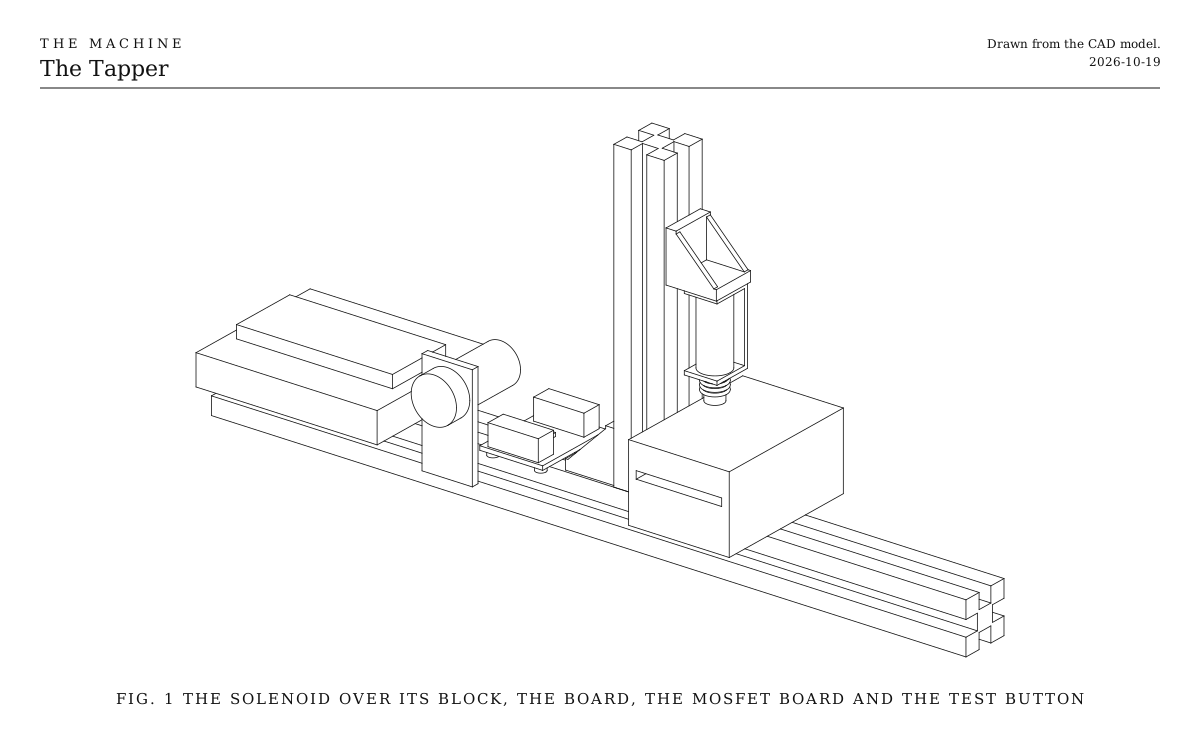
3DWhere we started. This is one version: a 12 V frame solenoid hanging from a short upright of extrusion over a scrap of hardwood, with the ESP32-S3 and the MOSFET board on the same bar. Everything is bought.

Overview

Cost, roughly
About $30
Building
An evening
Difficulty
Easy
The whole snack. A line drawing of the 3D model above.
Fig. 1The whole snack. A line drawing of the 3D model above.

How it works

  • It’s the listener with a solenoid. The listener from the Bridge’s first test raises GPIO 16 for 5 ms on every note it’s cued. The Tapper raises the same pin long enough to fire a solenoid, through a MOSFET board, and the plunger knocks a block of wood.
  • The Bridge sends each note about a second early. That’s how every element has time to get ready. The Tapper’s part is small: it fires a few milliseconds before the note, by however long the plunger takes to travel, so the knock lands on time.
  • Louder notes push longer. The note’s loudness sets the pulse, from 8 ms for the softest to 25 ms for the loudest. A longer push throws the plunger harder.
  • It does everything else an element does. It finds the Bridge, follows its clock, stops when the Bridge stops, and goes quiet when the signal does. That all comes from the shared code every element runs, so the Tapper’s own program is one page.

What it teaches

  • Switching a coil. A pin on the ESP32 gives a few milliamps at 3.3 V. The solenoid wants a third of an amp at 12 V. The MOSFET board is the switch between them, and its diode protects it from the coil’s kick. The Cannon lets its spring go with a solenoid, and the Swinging Striker and the Click pull with electromagnets, all switched this way.
  • Two supplies and one ground. The board runs from USB and the solenoid from its own supply, and the grounds join so the signal means something. Every element has a quiet supply for its brain and a rough one for its muscles.
  • Firing early. Every moving part takes time to arrive. The Tapper’s few milliseconds are the simplest case of what the bigger elements work out over a whole second.

Notes

  • This is a first design, not yet built. The model shows the version we started with.
  • Costs are rough estimates for budgeting, not checked prices. They don’t include the ESP32-S3 board.
  • The firmware compiles but hasn’t yet run on a built Tapper. It listens for Control, the one broadcast signal every element hears.

Parts

Ingredients

KindPartQtySourceEach
BoughtSolenoid, 12 V open-frame push type, JF-0530B, 10 mm strokeYour choice: see The solenoidIts frame has two M3 holes. Check yours before you buy the screws.1Amazon, often in pairs$5.00
BoughtMOSFET driver board, Adafruit 5648Turns fully on from the ESP32's 3.3 V and switches up to 1.5 A, with the diode that protects it from the coil's kick already on the board. Any other module that turns fully on from 3.3 V will do; add a 1N4007 diode across the solenoid if it has none. Avoid the common IRF520 modules, which need more than 3.3 V.1Adafruit$4.00
BoughtWall supply, 12 V 2 A, with a 5.5 x 2.1 mm barrel plug1·$9.00
BoughtBarrel jack to screw terminal adapter, 5.5 x 2.1 mm1·$2.00
BoughtESP32-S3 board, such as an ESP32-S3-DevKitC-1, on a screw-terminal expansion boardNot counted in the cost. The board that ran the Bridge's first test as the listener does the job, and a new one is about $15. Its own colour LED shows the status light, so there's nothing else to wire for it.1··
BoughtMomentary push button, normally open, for the test buttonA short press plays a soft, a middling and a loud tap. A wire touched from GPIO 14 to ground does the same.1·$1.00
BoughtAluminum extrusion, 20 mm V-slot, 300 mm, the baseIt becomes the Stop Bar's bar later, or swap in a 500 mm one now.1·$4.00
BoughtAluminum extrusion, 20 mm V-slot, 120 mm, the upright1·$2.00
BoughtCorner brackets for 20 mm V-slot, cast, with their M5 screws and T-nutsOne joins the upright to the base. The other holds the solenoid.2·$1.00
BoughtM5 x 10 screws and T-nuts for 20 mm V-slotFor the MOSFET board and the block, if you screw it down.4·$0.30
BoughtM3 x 6 screws and washersFix the solenoid's frame to its bracket.2·$0.20
BoughtHookup wire, 22 AWG, red, black and a signal color1·$3.00
SalvagedA scrap of hardwood, about 60 x 40 x 30 mm, and a strip of feltYour choice: see What it taps1··
Total$33.60

Tools

  • Small screwdriver, for the screw terminals
  • Hex keys, 2.5 and 3 mm
  • Wire strippers
  • A USB cable that carries data, for loading the program and for the console
  • The Arduino environment, or arduino-cli, with the ESP32 boards package

Choices

Decisions that are yours to make. Where we started is the version in the 3D model and the ingredients: a starting point, not the right answer.

The solenoid

Which solenoid taps?

12 V open-frame push solenoid, JF-0530B typeWhere we started

SoundA firm, woody knock

About $5, often sold in pairs. A 10 mm stroke and enough push to make a block speak, drawing about 0.3 A. It wants a 12 V supply, and a long pulse makes it hot, so the firmware keeps pulses short.

5 V mini push-pull solenoid, such as Adafruit's

SoundA light tick

About $5. It draws about 1.1 A, so it wants a 5 V supply of 2 A or more, not a laptop's USB port. Its stroke is only 3 mm, so it's gentler and quieter, better for glass or a small bell than for wood.

Either way it's a push type, with a spring that returns the plunger. The plunger should tap and come back, not press and stay.

What it taps

What does the plunger hit?

A scrap of hardwoodWhere we started

SoundA dry knock, like a woodblock

Free. Any dense offcut about 60 mm long, oak or maple. Stand it on a strip of felt so the bar doesn't ring with it.

A wooden temple block

SoundA hollow, pitched tock

About $11. Louder, and it has a note. It's round, so it wants a ring of felt or a cradle to sit still.

A tin can or a jar

SoundA bright clank, or a ping with water in the jar

Free, and the most fun to swap around. A jar's note changes with how much water is in it. Glass is fragile, so start with short pulses.

Assembly

  1. 1

    Load the Tapper's program onto the ESP32-S3, as the firmware's README describes for the listener, with tapper in place of listener.

    CheckIts light breathes blue while it looks for the Bridge. Type status into the console at 115200 baud and it answers.

  2. 2

    Stand the upright on the base with a corner bracket on its left side, just past halfway along.

  3. 3

    Screw the solenoid's frame to the second corner bracket with two M3 screws, plunger pointing down, and fix the bracket high on the upright's side.

  4. 4

    Set the block on its felt under the plunger.

    CheckPushed down by hand to the end of its stroke, the plunger presses into the block by about 3 mm. Slide the solenoid's bracket up or down the upright until it does.

  5. 5

    Wire the MOSFET board and the solenoid as on the Wiring tab, with the supply unplugged.

    TrickyThe board's input terminal takes the 12 V and its output terminal the solenoid. Swapped, the solenoid never fires and the board's diode can't protect it.

  6. 6

    Plug in the 12 V supply, then press the test button.

    CheckThree taps, soft, middling and loud, half a second apart.

  7. 7

    Activate the Bridge.

    CheckThe Tapper knocks on every beat, with its light flicking white each time.

Wiring

The solenoid runs from its own 12 V supply, switched by the MOSFET board. The ESP32 runs from USB and only tells the MOSFET board when, through GPIO 16, the pin the listener pulsed on every note. The two grounds join at the board, so the signal has something to be measured against. The status light is the board's own colour LED.

Wiring · The Tapper
PowerSignalMotorGround, all joinedPins drawn faint are left empty.

Wire list

  1. USB, from a charger or the laptop, 5V

    ESP32-S3 board, USB

    PowerUSB cable

  2. Wall supply, 12 V, +

    MOSFET driver board, IN+

    PowerRed, 22 AWG

    The board's power input. Labels vary between boards; this one is the + of the terminal marked for the supply.

  3. Wall supply, 12 V, −

    MOSFET driver board, IN−

    GroundBlack, 22 AWG

  4. MOSFET driver board, OUT+

    Solenoid, 12 V, +

    MotorRed, 22 AWG

  5. MOSFET driver board, OUT−

    Solenoid, 12 V, −

    MotorBlack, 22 AWG

    Not ground. The MOSFET switches this side of the solenoid.

  6. ESP32-S3 board, GPIO 16

    MOSFET driver board, SIG

    SignalAny color, 22 AWG

    High fires the solenoid. The firmware never holds it high for more than the longest pulse.

  7. MOSFET driver board, GND

    ESP32-S3 board, GND

    GroundBlack, 22 AWG

    Joins the board's ground to the supply's.

  8. Test button, 1

    ESP32-S3 board, GPIO 14

    SignalAny color, 22 AWG

    The test button. The ESP32's own pull-up holds the pin high until it's pressed.

  9. Test button, 2

    ESP32-S3 board, GND

    GroundBlack, 22 AWG

Get these right

Nothing but the MOSFET board touches 12 V
Keep the 12 V wires on the board's screw terminals. 12 V on any of the ESP32's pins destroys it.
The diode
A coil switched off pushes back with a spike of many times its supply voltage. A diode across it gives that spike a way round in a loop through the coil, so it never reaches the MOSFET. Adafruit's board has one built in. With a board that doesn't, clamp a 1N4007 across the solenoid's terminals, its band toward +. Every element with a solenoid or an electromagnet has one.

Mounting

The whole Tapper sits on one bar of extrusion. Every part fixes to it with T-nuts, so anything slides to a new place with a hex key.

The base
A 300 mm bar on the bench. Later it becomes the Stop Bar's bar, with the Tapper moved along to make room.
The upright
Joined to the base's top slot by a corner bracket on its left side, which leaves the stretch of bar to its right clear for the block.
The solenoid
Its frame screwed to a second corner bracket, whose other leg fixes high in the upright's right slot. Loosen it to slide the solenoid up or down.
The block
On a strip of felt on the base, under the plunger. A screw and T-nut through a hole in the block holds it still, or a dab of hot glue on the felt.
The electronics
The ESP32 on its expansion board and the MOSFET board rest on the bar's left end, on double-sided foam tape, with the test button beside them. The Stop Bar puts them in a box.

Tuning

Tuning

How early it fires
The plunger takes a few milliseconds to travel. The firmware fires that much before each note, 12 ms to start with. With the Bridge playing alongside a click, type travel 8 or travel 16 into the console until the knock lands on the click. When it sounds right, write the number into the settings at the top of the program.
How long it pushes
A short pulse taps and lets the spring pull the plunger off, so the block rings. A long one presses the plunger into the block and deadens it. Type pulse 8 25 for the softest and the loudest note's pulse, in ms, and try shorter until the soft notes stop sounding at all.
The gap
A plunger that starts close to the block hits it before it's up to speed, and sounds soft. One that has to go almost its whole stroke hits harder but may not reach on a soft note. About 6 mm of free travel before the block is a good start.

Variations

Two notes
A second solenoid and MOSFET board on GPIO 17, over a second block or a jar with a different note. In the program, play note 0 on one and every other note on the other. It's the start of an element like the Cannon.
A hidden tap
The Click's variation hides a solenoid inside a metronome's case. Here it stays on show, since sound comes from motion you can see.