Skip to content

The Machine · Recipes

The Click

Design stage

Updated 2026-10-19

An ordinary wind-up metronome swings and ticks like any other, but the Machine is quietly playing it. A hidden cord slides its weight to set the tempo, and a hidden magnet nudges each swing onto the beat.

Loading the model

Drag to turn · scroll to zoom

Printed

3DWhere we started. This is one version of it, a generic wind-up pyramid metronome about 22 cm tall on a slim printed base that bolts to a V-slot bar. Press Play: a technician starts it, the winch pulls the weight down the arm, and the tempo rises. The case hides the mechanism, and the Assembly, Wiring and Mounting tabs show what's inside. Printed parts are drawn in orange; everything else is bought.

Overview

Cost, roughly
About $110
Printing
About 5 hours
Building
A weekend, after an evening opening up the metronome
Difficulty
Involved

Anatomy

1
Energy source
The metronome's own spring, kept wound by a hidden motor
2
Control
A winch that slides the weight along the arm, and an electromagnet that nudges each swing
3
Sounding body
The metronome's own escapement, which makes the tick
4
Reset
None needed. At the end, a technician catches the arm and hooks it, as with any metronome
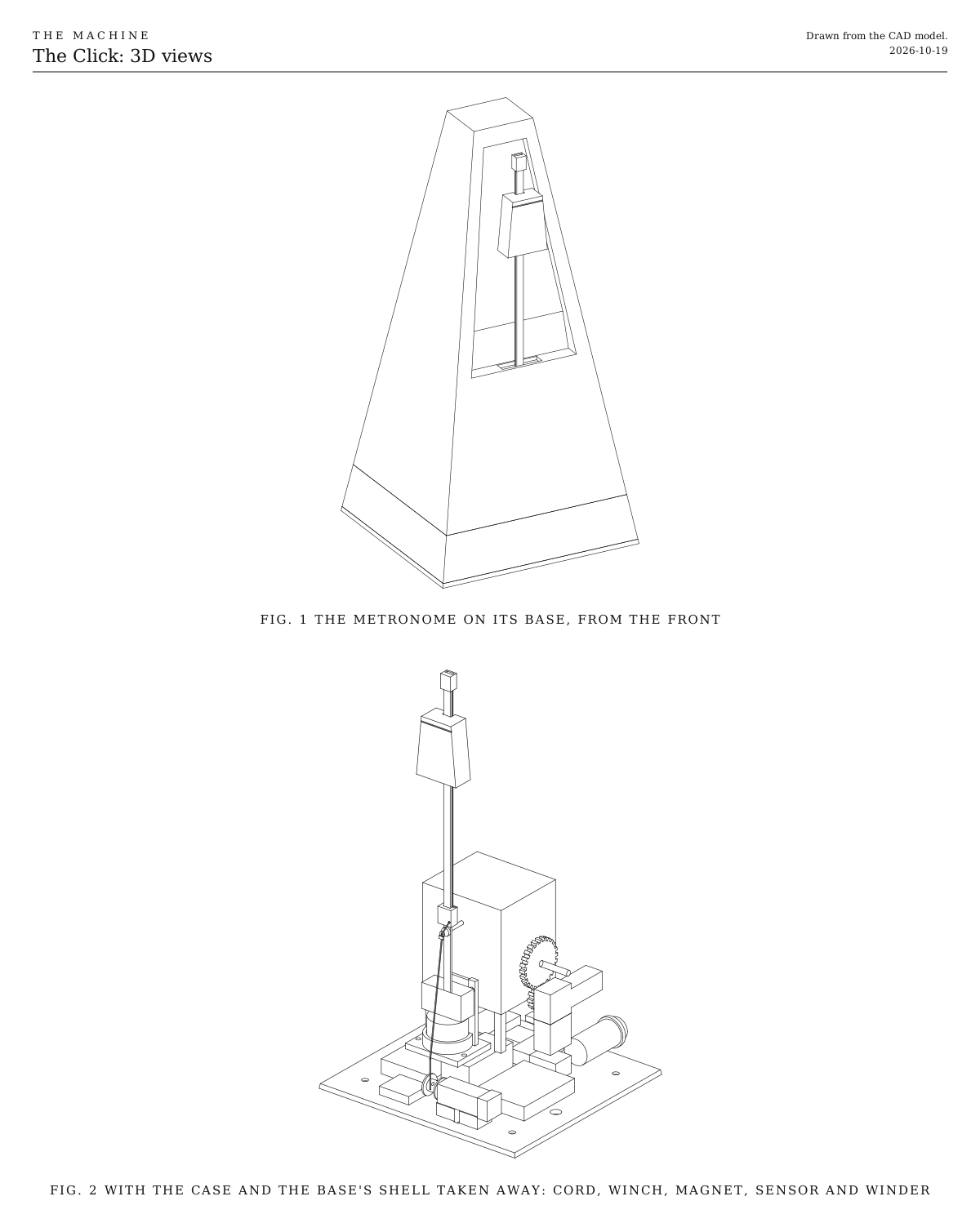
3D views. It shows the metronome on its base, and the hidden parts with the case and the base's shell taken away. Both are drawn from the CAD model.
Fig. 13D views. It shows the metronome on its base, and the hidden parts with the case and the base's shell taken away. Both are drawn from the CAD model.

How it works

  • The Click is a bought wind-up metronome that still works exactly as it was made to. Its spring drives its escapement, and the escapement keeps the arm swinging and makes the tick. A technician starts it by hand, like any metronome.
  • Nothing shows. Everything the system adds hides inside the case and in a slim base underneath. The arm, the weight and the tick are the metronome’s own.
  • The weight moves by itself. A fine cord tied to the top of the weight runs up behind the arm, over a tiny bearing at its tip, and back down behind it to the pivot. From there it goes to a point on the inside of the case in line with the pivot, and down into the base to a small winch. Reeling in lifts the weight and the tempo slows. Letting out lets it sink, and the tempo rises.
  • The swing never tugs the cord. Every point on the arm swings in a circle around the pivot’s center line. The cord meets the case on that line, so its length from the arm never changes as the arm swings, and the weight stays where the winch put it.
  • An electromagnet nudges the swing. It sits under the pendulum’s bottom weight, inside the case. Switched on just before the bob reaches the middle, it pulls it in a little sooner. Switched on just after, it holds it back. Switched off, it does nothing at all, so the swing stays the metronome’s own.
  • A sensor reads the swing. A small light sensor sees the bob pass the middle, so the board knows when each tick is coming and how big the swing is.
  • The spring never runs down. A small gear motor turns the winding arbor through two printed gears, a little at a time, so it ticks for a whole show.
  • It can run free or locked. Free, it keeps whatever tempo its weight sets, drifting against everything else. When the Machine sends “locked from beat 129, with four beats to get there”, it slides the weight a few millimeters to run a touch fast or slow and nudges each swing with the magnet. As the ticks land on the grid, it slides the weight back. The real tick can’t be silenced, so the lock is heard as the tick drifting onto the beat.
  • An ESP32 in the base listens for the wireless signal, like every element, and runs from a rechargeable cell charged over USB. If it hears nothing for a couple of seconds, it stops moving the weight and leaves the magnet off. The arm keeps swinging on its own spring until a technician catches it.

In the performance

The Click opens Metronome to metronome. A technician starts it, alone on stage, and it runs free. As the other elements arrive it’s the one steady thing in the noise, and at the lock it lines up with everyone else. When the stage is stripped back at the end, it’s the last thing ticking.

Ways to play

  • It runs free, keeping its own tempo while everything else drifts around it.
  • It changes its mind. The weight slides and the tempo follows, slowly enough that it looks like the metronome deciding to go faster.
  • It locks, landing its tick on the grid with everyone else.

You can try it before any code. Wind it, start it, and pull the cord gently from below while it swings. The weight climbs, and the tempo falls away under your hand.

Notes

  • This is a first design, drawn but not yet built. The metronome in the model is a generic one, so the parts inside will need fitting to yours.
  • Once the cord and the tip cap are on, the metronome’s own scale is no longer exact, because they change its balance a little. The board measures the real tempo instead of trusting the scale.
  • Costs in the parts list are rough estimates for budgeting, not checked prices. They add up the version we started with.
  • Firmware comes with Control, the one broadcast signal every element listens to. For a first test, any sketch that runs the winch in and out shows the weight moving and the tempo following.

Parts

Ingredients

KindPartQtySourceEachFile
PrintedTip cap, clips over the top of the arm and carries the tiny bearing1··STL
PrintedPivot guide, clips on the arm under the window and brings the cord round to the front1··STL
PrintedSpool, on the winch motor's shaft1··STL
PrintedChassis, holds the electromagnet and the swing sensor on the case's floor1··STL
PrintedWinder bracket, holds the winder motor beside the clockworkYour choice: see Keeping it wound1··STL
PrintedWinder gear, 24 teeth, clamps on the winding arborYour choice: see Keeping it wound1··STL
PrintedWinder pinion, 12 teeth, on the winder motor's shaftYour choice: see Keeping it wound1··STL
PrintedBase, a slim tray under the metronome that carries its slope down1··STL
PrintedBase plate, closes the base from underneath and carries the winch1··STL
BoughtMechanical wind-up metronome, pyramid styleYour choice: see The metronome1·$18.00
BoughtBraided fishing line, about 0.2 mm, darkYour choice: see The cordAbout a meter is enough. The rest of the spool will last for years.1·$8.00
BoughtMiniature bearing, 1 mm bore, 3 mm across (size 681), and a 1 mm steel pin for itIt turns the cord at the arm's tip. A short length of 1 mm piano wire makes the pin.1·$2.00
BoughtSmall smooth eyelet, about a 1 mm holeThe smallest ceramic fishing-rod guide ring works well. It's where the cord meets the case, on the pivot's center line.1·$1.00
BoughtN20 gear motor with magnetic encoder, 6 V, about 300 rpmThis is the winch. Its encoder counts its turns, so the ESP32 knows where the weight is.1·$9.00
BoughtN20 worm-gear motor, 6 V, about 30 rpmYour choice: see Keeping it woundThis is the winder. A worm gear can't be turned backwards, so the spring can't unwind it.1·$8.00
BoughtElectromagnet, 20 mm across, 5 V (sold as P20/15)Your choice: see Nudging the swing1·$6.00
BoughtSmall steel washer, if the bob isn't steelYour choice: see Nudging the swingCheck with a magnet. Many bobs are brass or zinc, which a magnet ignores.1·$0.20
BoughtReflective light sensor board (TCRT5000)It sees the bob pass the middle of its swing.1·$1.00
BoughtESP32 mini board (D1 mini ESP32)It's the same ESP32 as every element, on a board small enough for the base.1·$7.00
BoughtDRV8833 dual motor driver boardIt drives the winch and the winder.1·$3.00
BoughtLiPo cell, 3.7 V, about 2000 mAh, with its own protection board, about 50 x 34 x 8 mmThis is the Click's own battery, in place of the shared power-tool pack, which couldn't hide under a metronome. It lasts about ten hours a charge.1·$9.00
BoughtUSB-C charger board for one cell, with protection (TP4056)1·$1.00
Bought5 V boost converter, fixed outputIt raises the cell's 3.7 V to the 5 V the ESP32 and the relay want.1·$3.00
BoughtIn-line mini blade fuse holder and 2 A fuse1·$2.00
BoughtLatching push switch, 16 mm, with two contacts, for the stopThis is the Click's stop button. It latches in when pressed and out when pressed again, and has two separate contacts.1·$3.00
BoughtMomentary push button, normally open, for the test buttonA short press plays each note once, and a long press relearns what the element can by itself. Any small panel button that closes while it's pressed will do.1·$1.00
BoughtSmall slide switch, for the power1·$0.50
BoughtRelay module, 5 V, high-level trigger, smallIt's the switch the motors' and the magnet's power goes through.1·$2.00
BoughtMOSFET, IRLB8721, to switch the electromagnetIt switches fully from the ESP32's 3.3 V.1·$1.00
BoughtSchottky diode (1N5819), a 100 µF 16 V capacitor, two 10 kΩ resistors and a 100 Ω resistor1·$1.00
BoughtThe status light and the number switches, as on the Control page1Link$2.00
BoughtSilicone wire, 26 AWG, and a scrap of perfboard1·$4.00
BoughtM3 heat-set inserts (4), M3 x 8 mm screws (4), and M3 x 12 mm self-tapping screws (3)The inserts and short screws hold the base plate on. The self-tapping screws come up through the base and the case's floor into the chassis and the winder bracket.1·$3.00
BoughtM5 x 10 mm screws and drop-in T-nutsYour choice: see How it stands2·$0.50
BoughtAluminum extrusion, 20 x 40 mm V-slot, 200 mm, or a place on any V-slot frameYour choice: see How it stands1·$5.00
BoughtSmall cable ties, double-sided foam tape and two-part epoxy1·$4.00
Total$105.70

Tools

  • 3D printer, PLA or PETG
  • Small screwdrivers, to open the metronome
  • A drill with 1, 3, 4 and 8 mm bits
  • Soldering iron, for the heat-set inserts and the wiring
  • A multimeter
  • A phone with a metronome app, to check tempos

Choices

Decisions that are yours to make. Where we started is the version in the 3D model and the ingredients: a starting point, not the right answer.

The metronome

Which wind-up metronome?

Plastic pyramidWhere we started

SoundA bright, crisp tick

It costs about $18, cheap enough to open up without worrying, and plastic is easy to drill. The model is drawn around one.

Wooden pyramid, such as a Wittner Maelzel

SoundA warmer, woodier tick

It costs $150 to $200. It has the classic look, but drilling it hurts more, and the inside is more crowded.

A vintage metronome

SoundEach has its own tick, often the loudest

An old spring and dried oil may need a service first. Make sure it ticks evenly before adding anything.

Any wind-up works if its arm swings in front of the case and its pendulum's bottom weight hangs inside, near the floor. Most do.

The cord

What pulls the weight?

Braided fishing line, about 0.2 mmWhere we started

SoundSilent

It's strong and barely stretches, so the weight stays where the winch puts it. Black or dark green hides best behind the arm.

Nylon monofilament

SoundSilent

It's clear, so it all but disappears, but it stretches, so the weight creeps a little as the tension changes.

Fine steel wire

SoundCan sing faintly as it runs over the bearing

It never stretches, but it kinks, and it wants gentler turns than line does.

The tick

What makes the click?

The metronome's own escapementWhere we started

SoundThe real tick, exactly where the swing puts it

Sound and swing always agree, because one makes the other. It ticks whenever the spring is wound, including while it lines up with the beat, and the bell keeps its own count.

A hidden solenoid

SoundA tap on the inside of the case, close to a real tick

The clockwork comes out and nothing needs winding. The tick can stay silent while it lines up and land exactly on the beat, but the electronics make it rather than the swing, so sound and sight can drift apart.

Nudging the swing

What pulls the swing onto the beat?

An electromagnet under the bobWhere we started

SoundSilent

It pulls the pendulum's bottom weight when switched on and does nothing when off, so the swing stays the metronome's own. The bob has to be steel, or carry a steel washer.

The weight alone

SoundSilent

Sliding the weight a little runs it fast or slow for a few beats, which is enough to line up. It's simpler, but slower to settle, and nothing keeps it swinging if the spring runs down.

Keeping it wound

How does the spring stay wound?

A hidden winder motorWhere we started

SoundA faint whir while it winds

It ticks for a whole show. The key turns slowly while it winds, which a sharp eye might catch. Fitting it depends most on your metronome's insides.

Wind it by hand before the show

SoundNo extra sound at all

There's nothing to fit. It runs only so long on one winding, so time yours at the show's tempo. When it runs down the tick stops, though the magnet can keep the arm swinging.

The stop switch

What cuts the motors' and the magnet's power at the element?

Latching push switch, 16 mm, with two contactsWhere we started

Small enough for the Click's case. It latches in when pressed and out when pressed again, so it stays stopped until someone means to start it. One contact cuts the power and the other tells the ESP32. About $3.

Two-pole slide or toggle switch

Smaller still, about $1. One pole cuts the power and the other tells the ESP32, so it does the same job. It doesn't read as a stop, and it flicks back on as easily as off. Rate it above what the motors and the magnet draw.

Keep the second pole either way. It tells the ESP32 the power was cut, so it resets itself when the power comes back, as after a stop from the Bridge. Either way the relay stays, since it's how a stop from the Bridge reaches the motors when no one is at the element. A two-pole switch wires as the push switch does, one pole for each of its contacts.

Print

Material
PLA or PETG
Layers
0.2 mm
Walls
3
Infill
30%

Everything fits a 150 mm bed and prints without supports. Nothing here gets warm, so PLA is fine. Print the tip cap and the pivot guide at 0.12 mm layers and in black, so they're crisp and vanish against the arm. Print the base in the metronome's color.

The printed parts

  • Tip cap, clips over the top of the arm and carries the tiny bearing

    Which way up
    On its side
    Supports
    None
    Time
    About 10 minutes

    Print it in black so it vanishes. The arm's slot is sized from the numbers at the top of the CAD script; set them to your arm.

    STL ↓
  • Pivot guide, clips on the arm under the window and brings the cord round to the front

    Which way up
    On its side
    Supports
    None
    Time
    About 10 minutes

    Its two 1.2 mm cord holes are small; clear them with a 1 mm drill if they close up.

    STL ↓
  • Spool, on the winch motor's shaft

    Which way up
    On one flange
    Supports
    None
    Time
    About 10 minutes
    STL ↓
  • Chassis, holds the electromagnet and the swing sensor on the case's floor

    Which way up
    Flat on its base
    Supports
    None
    Time
    About 45 minutes
    STL ↓
  • Winder bracket, holds the winder motor beside the clockwork

    Which way up
    Flat on its base
    Supports
    None
    Time
    About 20 minutes
    STL ↓
  • Winder gear, 24 teeth, clamps on the winding arbor

    Which way up
    Flat
    Supports
    None
    Time
    About 15 minutes

    Drill or file its hole to a snug fit on your winding arbor, then fix it with a drop of epoxy.

    STL ↓
  • Winder pinion, 12 teeth, on the winder motor's shaft

    Which way up
    Flat
    Supports
    None
    Time
    About 10 minutes
    STL ↓
  • Base, a slim tray under the metronome that carries its slope down

    Which way up
    Upside down, on its top
    Supports
    None
    Time
    About 3 hours

    Print it in the metronome's color. The four heat-set inserts go into its corner bosses once it's printed.

    STL ↓
  • Base plate, closes the base from underneath and carries the winch

    Which way up
    Flat, cradle up
    Supports
    None
    Time
    About 1.5 hours
    STL ↓

Assembly

  1. 1

    Wind the metronome and let it run at a slow, a middling and a fast tempo, so you know how it sounds. Time how long one winding lasts at a middling tempo.

    CheckTick and tock come evenly. If it limps, level it or have it serviced before going on.

  2. 2

    Open the case. On most, screws under the base let the floor and the clockwork come out together. Photograph everything before you move it.

    TrickyEvery metronome is put together differently. Note where the bob hangs, how much room there is in front of the pendulum, and where the winding arbor runs. The printed parts are drawn around a guess, and the numbers at the top of the CAD script set them to yours.

  3. 3

    Measure your metronome, set the numbers under "The metronome" at the top of the CAD script, run it, and print the parts.

    CheckThe script reports no overlaps, at rest or swung either way.

  4. 4

    Ease the weight's grip. Take out or open up the spring clip inside it, so it slides down the arm under its own weight.

    TrickyToo loose and it rocks and buzzes on every tick; too tight and it sticks instead of following the cord. A strip of PTFE tape inside it helps.

    CheckLifted to the top and let go, it slides smoothly down, without rattling.

  5. 5

    Push the tip cap onto the top of the arm, with the tiny bearing on its pin behind the arm. Clip the pivot guide onto the arm just below the window's sill.

  6. 6

    Glue the eyelet inside the front wall, exactly on the pivot's center line, a millimeter or two in front of the pivot guide.

    TrickyThis is the one step that has to be exact. Every point on the arm swings in a circle around the pivot's center line, so a cord that meets the case on that line stays the same length however the arm swings. Off the line, the swing tugs the weight on every beat. With the arm still, sight from the front. The eyelet's hole should sit right over the pivot.

  7. 7

    Drill the case's floor, using the base as a template. A 3 mm hole goes straight below the eyelet for the cord, with holes beside it for the wires and the screws.

  8. 8

    If the bob isn't steel, glue a small steel washer under it. Seat the electromagnet in the chassis, and fit the chassis on the case's floor so the magnet sits under the bob.

    TrickyCloser is stronger, but if the bob touches the magnet it stops dead. Swing it hard by hand to be sure it clears.

    CheckThe magnet's face is about 2 mm under the bob at the middle of the swing, and the arm swings by hand as freely as before.

  9. 9

    Screw the swing sensor to the chassis's post, facing the back of the bob, a couple of millimeters from it. A strip of white or foil tape on the bob helps it see.

    CheckOnce it's wired, its little light blinks each time the bob passes the middle.

  10. 10

    Fit the winder. The gear goes on the winding arbor, between the clockwork and the case's wall, and the pinion on the worm-gear motor's shaft. The bracket goes on the floor where the two mesh.

    TrickyThis depends most on your metronome. If there's no room on the arbor for the gear, wind it by hand instead (see Keeping it wound, under Choices).

    CheckTurned by hand through the motor's shaft, the key turns with it, and the gears don't skip.

  11. 11

    Thread the cord. Tie it to the back of the weight at the top, run it up behind the arm and over the tip bearing, and back down behind the arm into the pivot guide. Bring it round to the front, through the eyelet, and down inside the front wall and out through the hole in the floor.

    CheckPulled gently from below, the weight rises. Let go, and it sinks.

  12. 12

    Put the clockwork back and close the case. Melt the four heat-set inserts into the base's corner bosses.

  13. 13

    Wire the base, following the wire list under Wiring. The fuse comes first, then the 5 V converter for the ESP32, and the stop switch and the relay for the motors and the magnet.

    TrickyCharge the cell with the power switch off. Keep the cell where nothing can press into it, and never let its leads touch.

    CheckWith the cell charged and no code running, nothing moves and the ESP32's light is on. Pressing the stop switch in and out changes nothing.

  14. 14

    Tie the cord's end to the spool, with the weight lifted to the top of its travel, and fix the winch in the plate's cradle with a cable tie. Close the base, then screw the metronome down onto it.

  15. 15

    Swing the arm by hand with the winch holding the cord.

    CheckThe weight stays still on the arm, and the tempo sounds as it did before you started. If the weight bobs with every swing, the eyelet is off the pivot's center line.

  16. 16

    Load the shared listening code with the Click's own part. Then let it learn its tempos. It slides the weight in small steps, times the swing at each and keeps the table.

    CheckAsked for 60, 90 and 120, it lands within a beat a minute of each, by a phone metronome.

Wiring

The fuse comes first, right after the charger board. The ESP32 runs from the 5 V converter. The motors' and the magnet's power goes through the stop switch and then the relay, so either one cuts it. Everything runs from one rechargeable cell in the base rather than the shared power-tool battery, because the Click has to look like an ordinary metronome. The status light, the number switches and the battery reading are wired the same way on every element, so they're on the Control page, not here.

Wiring · The Click
PowerSignalMotorGround, all joinedPins drawn faint are left empty.

Wire list

  1. LiPo cell, 3.7 V, +

    USB-C charger board, B+

    PowerRed, 22 AWG

    Solder it to the board's B+ pad. Never let the cell's two leads touch.

  2. LiPo cell, 3.7 V, −

    USB-C charger board, B−

    GroundBlack, 22 AWG

    The cell's own minus goes only here. Every other ground joins at the board's OUT−.

  3. USB-C charger board, OUT+

    Fuse, 2 A, in

    PowerRed, 22 AWG

    Nothing connects ahead of the fuse.

  4. Fuse, 2 A, out

    Power switch, in

    PowerRed, 22 AWG

  5. Power switch, out

    5 V boost converter, IN+

    PowerRed, 22 AWG

  6. Power switch, out

    Stop switch, 1 COM

    PowerRed, 22 AWG

  7. Stop switch, 1 NC

    Relay module, COM

    PowerRed, 22 AWG

    The stop switch's first contact opens when it's pressed in, cutting the motors' and the magnet's power itself, so a program that hangs can't ignore it.

  8. Relay module, NO

    DRV8833 motor driver, VM

    PowerRed, 22 AWG

  9. Relay module, NO

    Electromagnet, +

    PowerRed, 26 AWG

  10. Capacitor, 100 µF, +

    DRV8833 motor driver, VM

    PowerThe capacitor's own leg

    Solder its legs straight onto the driver's VM and GND pins. The stripe on its side marks the − leg.

  11. 5 V boost converter, OUT+

    ESP32 mini board, 5V

    PowerRed, 22 AWG

  12. 5 V boost converter, OUT+

    Relay module, VCC

    PowerRed, 26 AWG

  13. ESP32 mini board, 3V3

    Winch motor's encoder, VCC

    PowerRed, 26 AWG

  14. ESP32 mini board, 3V3

    Swing sensor (TCRT5000), VCC

    PowerRed, 26 AWG

  15. USB-C charger board, OUT−

    5 V boost converter, IN−

    GroundBlack, 22 AWG

  16. USB-C charger board, OUT−

    DRV8833 motor driver, GND

    GroundBlack, 22 AWG

    This is the motors' return.

  17. USB-C charger board, OUT−

    MOSFET, IRLB8721, S

    GroundBlack, 22 AWG

    This is the magnet's return.

  18. Capacitor, 100 µF, −

    DRV8833 motor driver, GND

    GroundThe capacitor's own leg

  19. 5 V boost converter, OUT−

    ESP32 mini board, GND

    GroundBlack, 22 AWG

  20. Relay module, GND

    ESP32 mini board, GND

    GroundBlack, 26 AWG

  21. Resistor, 10 kΩ, 2

    ESP32 mini board, GND

    GroundThe resistor's own leg

  22. Resistor, 10 kΩ, 2

    MOSFET, IRLB8721, S

    GroundThe resistor's own leg

  23. Stop switch, 2 COM

    ESP32 mini board, GND

    GroundBlack, 26 AWG

  24. Test button, 2

    ESP32 mini board, GND

    GroundBlack, 26 AWG

  25. Winch motor's encoder, GND

    ESP32 mini board, GND

    GroundBlack, 26 AWG

  26. Swing sensor (TCRT5000), GND

    ESP32 mini board, GND

    GroundBlack, 26 AWG

  27. ESP32 mini board, GPIO 33

    Relay module, IN

    SignalAny color, 26 AWG

  28. Resistor, 10 kΩ, 1

    Relay module, IN

    SignalThe resistor's own leg

    It holds the relay off while the ESP32 starts, when its pins float.

  29. ESP32 mini board, GPIO 23

    Resistor, 100 Ω, 1

    SignalAny color, 26 AWG

  30. Resistor, 100 Ω, 2

    MOSFET, IRLB8721, G

    SignalThe resistor's own leg

  31. Resistor, 10 kΩ, 1

    MOSFET, IRLB8721, G

    SignalThe resistor's own leg

    It holds the magnet off while the ESP32 starts.

  32. ESP32 mini board, GPIO 18

    DRV8833 motor driver, SLEEP

    SignalAny color, 26 AWG

    High wakes the driver. The ESP32 holds it low while the Click waits, so neither motor can creep.

  33. ESP32 mini board, GPIO 25

    DRV8833 motor driver, AIN1

    SignalAny color, 26 AWG

  34. ESP32 mini board, GPIO 26

    DRV8833 motor driver, AIN2

    SignalAny color, 26 AWG

  35. ESP32 mini board, GPIO 27

    DRV8833 motor driver, BIN1

    SignalAny color, 26 AWG

  36. ESP32 mini board, GPIO 4

    DRV8833 motor driver, BIN2

    SignalAny color, 26 AWG

  37. Stop switch, 2 NC

    ESP32 mini board, GPIO 13

    SignalAny color, 26 AWG

    This is the stop switch's second contact, so the ESP32 knows it's been pressed.

  38. Test button, 1

    ESP32 mini board, GPIO 15

    SignalAny color, 26 AWG

    The test button. The ESP32's own pull-up holds the pin high until it's pressed. The board reads GPIO 15 as it starts, but only to choose whether to print, so holding the button then does no harm.

  39. Swing sensor (TCRT5000), D0

    ESP32 mini board, GPIO 32

    SignalAny color, 26 AWG

    It goes low while the sensor sees the bob.

  40. Winch motor's encoder, A

    ESP32 mini board, GPIO 19

    SignalAny color, 26 AWG

  41. Winch motor's encoder, B

    ESP32 mini board, GPIO 21

    SignalAny color, 26 AWG

    The two encoder channels count the spool's turns, and their order gives the direction.

  42. DRV8833 motor driver, AOUT1

    Winch motor, M1

    MotorThe motor's own leads

  43. DRV8833 motor driver, AOUT2

    Winch motor, M2

    MotorThe motor's own leads

  44. DRV8833 motor driver, BOUT1

    Winder motor, M1

    MotorRed and black, 26 AWG, soldered to the motor's tabs

  45. DRV8833 motor driver, BOUT2

    Winder motor, M2

    MotorRed and black, 26 AWG, soldered to the motor's tabs

  46. Electromagnet, −

    MOSFET, IRLB8721, D

    PowerThe magnet's own lead

    Seen from the front, the MOSFET's legs are G, D and S, left to right.

  47. Electromagnet, −

    Diode, 1N5819, A

    PowerThe diode's own leg

  48. Diode, 1N5819, K

    Electromagnet, +

    PowerThe diode's own leg

    It goes across the magnet, with its stripe toward +, and soaks up the kick when the magnet switches off.

Get these right

The cell
Use a cell with its own protection board, charge it with the power switch off, and keep it where nothing can press into it. A damaged lithium cell can catch fire.
The 5 V converter
A fixed 5 V converter needs no setting. If yours is adjustable, turn it to 5.0 V with the cell in and a multimeter on its output before the ESP32 is connected. More than about 6 V destroys the board.
Motor direction
If the weight goes up when it should go down, swap the winch's two motor leads. If the winder turns the key the wrong way, swap the winder's.
The battery reading
The Control page's battery reading is sized for the power-tool pack. With one cell it still works but reads low; two 100 kΩ resistors in its place suit a single cell better.
The pins
Any free ESP32 pins will do, except 0, 2, 5 and 12, which the board reads as it starts, and 34 to 39, which have no pull-up for the stop switch or the encoder. The board reads 15 as it starts too, but only to choose whether to print, so 15 carries the test button on every element. If you use others, the firmware needs to know.

Mounting

The Click stands on a slim printed base that bolts to a V-slot bar with two T-nuts, so it can sit on any frame in the Machine or stand on a table by itself. Inside the case, the printed parts screw down to the case's floor from underneath, so nothing shows from outside.

The base on the bar
The base plate bolts to the top of a 20 x 40 V-slot bar with two M5 screws into drop-in T-nuts. The base then screws onto the plate with four M3 screws into heat-set inserts.
The metronome on the base
Three M3 self-tapping screws come up through the base's top and the case's floor, two into the chassis and one into the winder bracket. They clamp the case down and hold both parts in place.
The electromagnet and the swing sensor
They sit in the chassis on the case's floor, the magnet under the bob and the sensor on a post behind it.
The winder
It sits on its bracket on the case's floor, beside the clockwork, with its pinion meshing with the gear on the winding arbor.
The eyelet
It's glued inside the front wall, on the pivot's center line.
The winch
It sits in the base on the plate's cradle, held with a cable tie. Its spool sits right under the hole the cord comes through.
The cell and the boards
They sit on the base plate on double-sided foam tape. The charging socket, the power switch and the stop switch sit in holes in the base's back wall.
The stop switch
It's on the back of the base, where the technician's hand finds it and the audience doesn't see it.

Where the electronics go

Under the metronome, or inside it?

A slim base underneathWhere we started

There's room for everything, and it reads as the metronome's own plinth. It adds about 3 cm to its height.

All inside the case

It's truly an ordinary metronome, but it only works if yours has room around the clockwork, because the cell and the boards have to fit between the pendulum and the walls.

How it stands

Bolted down, or free?

On a V-slot barWhere we started

It's fixed in place on any frame with two T-nuts, so it can't be knocked over or walk with its own swing.

Free-standing

It stands on a table or a riser, like any metronome. Put felt pads under the base plate, since it can creep on a hard surface as it swings.

Either way, keep the stop switch where a hand finds it without reaching past the arm.

Tuning

Tuning

The test button
A short press asks for 60, 90 and 120 beats a minute in turn, a few bars each, to check against a phone metronome. Hold it for two seconds and it learns its tempos again: it slides the weight in small steps, times the swing at each and keeps the table. Start the arm swinging by hand first, for either. It works only while the element is resting, with no Bridge in range or with the Bridge holding it silent. While it plays or is stopped, the button does nothing. A stop ends a test at once, and pressing again ends one early. The eyelet and the bell's lever are still set by hand.
Tick and tock uneven
The metronome isn't level, or the base tips it. Level it until tick and tock match. A metronome out of beat stays out of beat whatever the system does.
The weight bobs as it swings
The eyelet is off the pivot's center line. Move it until the weight stays still on the arm when you swing it by hand.
The weight won't sink
The weight grips the arm too hard, or the cord drags. Ease the clip, smooth the cord's turns, or use a slicker line.
A whine when the weight moves
The winch is moving too fast. Slow moves are almost silent. Keep the quick ones for the lead-in to a lock, when the room is loud anyway.
It won't settle onto the beat
The nudges are too weak. Lengthen the magnet's pulses, or bring it a little closer to the bob. Or ask for a longer lead-in to the lock.
The arm jerks near the middle
The magnet is too strong or too close. Shorten its pulses, or put a thin shim under it.
The bell rings on the wrong beat
The bell counts ticks from wherever it was started, not from the bar line, and the system can't move its count. Set its lever to 0 unless its own count is part of the piece.
The key turns while it winds
That's the winder at work. Wind in short bursts during loud passages, when nobody is watching the key.
It runs down mid-show
The winder isn't keeping up with the spring. Wind more often, or for longer each time.

Variations

A solenoid click
Take the clockwork out, let the electromagnet keep the swing going, and give the tick to a small solenoid tapping the inside of the case. The tick can then stay silent while it lines up and land exactly on the beat, and nothing needs winding. The catch is that the swing no longer makes the sound, so sound and sight can drift apart.
The Click leading
Instead of following the shared clock, the clock could follow the Click, as the Control page suggests. The swing sensor already knows its every beat; something on the controller's side would need to watch it too.
Several Clicks on one bar
Metronomes on a loose shared platform pull each other into step, which is the demonstration the Click comes from. Here the Machine decides when. Two or three can drift apart in front of an audience, then fall into step on a given beat.
A stage-size metronome
The same parts scale up to a metronome you build yourself, about 55 cm tall, which reads from the back of a room. A big pendulum is a slow one, so it tops out around 180 beats a minute, and the case becomes a woodworking project.
Everything inside the case
A roomier metronome can take the cell and the boards inside its own case, leaving no base at all. Measure around the clockwork first; the cell is the hard part to place.