Skip to content

The Machine · Snacks

The Stop Bar

Design stage

Updated 2026-10-21

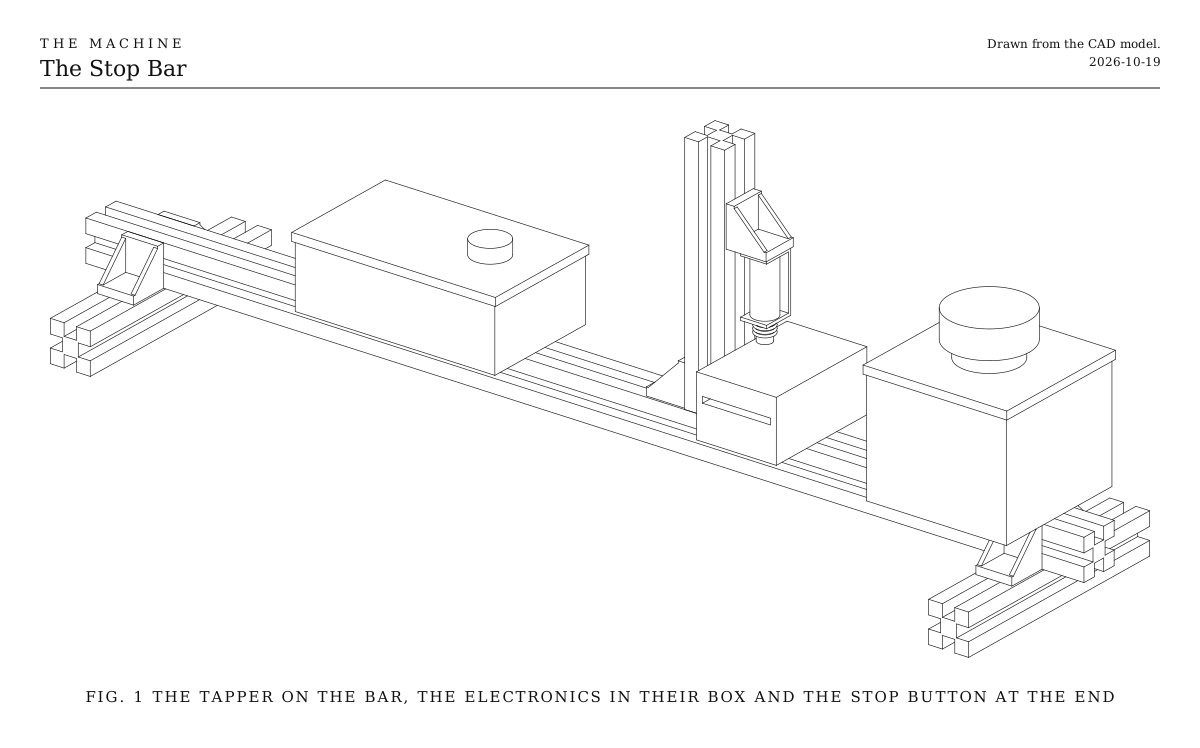
A bar of extrusion on two feet, with a red stop button, a relay and a box for the electronics. The Tapper moves onto it, and so can any snack after it. It wires the stop the way every element is wired: a button that cuts the power with its own contacts, and a relay so the Bridge can cut it too.

Loading the model

Drag to turn · scroll to zoom

Printed

3DWhere we started. This is one version: a 500 mm bar on two feet, with the Tapper on it, the electronics in a small box, and the stop button in its yellow box at the end, where a hand finds it. Everything is bought.

Overview

Cost, roughly
About $40
Building
An evening
Difficulty
Easy
The whole snack. A line drawing of the 3D model above.
Fig. 1The whole snack. A line drawing of the 3D model above.

How it works

  • The stop button cuts the power itself. Its main contact sits in the 12 V line. Pressed, it opens, and the solenoid has nothing to fire with, whatever the program is doing.
  • Its spare contact tells the ESP32. It closes when the button is pressed, pulling GPIO 4 to ground. The ESP32 then knows it’s stopped, shows red, refuses the test button, and starts fresh once the button is released.
  • The relay is the Bridge’s hand on the power. When the Bridge stops, or goes silent, the ESP32 drops the relay a moment later, so the power is cut even with no one at the snack. It turns the relay on again only once the stop is cleared.
  • Nothing in the program changes. The shared code every element runs already reads GPIO 4 and drives the relay on GPIO 5. The Tapper ran without them because, with nothing wired, GPIO 4 reads as not pressed.

What it teaches

  • The stop every element has. Every recipe in the Machine wires its stop exactly like this: fuse, stop button, relay, then the moving parts. Building it once on a snack makes it familiar before it matters on something with a motor that can pinch.
  • Mounting to extrusion. The bar, the feet, T-nuts and corner brackets are how every element is built. This bar becomes the bench rail the next snacks mount to.

Notes

  • This is a first design, not yet built. The model shows the version we started with.
  • Costs are rough estimates for budgeting, not checked prices.
  • It runs the Tapper’s firmware, which compiles but hasn’t yet run on a built snack.

Parts

Ingredients

KindPartQtyEach
BoughtLatching emergency-stop button, 22 mm, one normally closed and one normally open contact, in a one-hole boxYour choice: see The stop switchThe normally closed contact is the main one, often marked NC or 11 and 12. The normally open one is the spare, often NO or 13 and 14.1$12.00
BoughtInline blade fuse holder, with a 3 A fuseRight after the supply, before anything else, as on every element.1$2.00
BoughtRelay module, 1 channel, 5 V, high-level trigger, contacts rated 10 AThe switch the Bridge's stop goes through. The ESP32 turns it on once everything is ready, and off shortly after a stop.1$3.00
BoughtResistor, 10 kΩHolds the relay off while the ESP32 starts.1$0.10
BoughtSmall project box, about 100 x 60 x 35 mmYour choice: see The electronics1$4.00
BoughtAluminum extrusion, 20 mm V-slot, 500 mm, the barOr keep the Tapper's 300 mm bar and fit everything closer together.1$6.00
BoughtAluminum extrusion, 20 mm V-slot, 120 mm, the feet2$2.00
BoughtCorner brackets for 20 mm V-slot, cast, with their M5 screws and T-nutsTwo under each end, joining the bar to its feet.4$1.00
BoughtM5 x 10 screws and T-nuts for 20 mm V-slotTwo each for the stop box and the electronics box.4$0.30
BoughtHookup wire, 18 AWG, red and blackFor the power line through the fuse, the stop button and the relay. The signals stay on 22 AWG.1$3.00
Total$39.30

Tools

  • Small screwdriver, for the screw terminals
  • Hex keys, 2.5 and 3 mm
  • Wire strippers
  • A multimeter with a continuity beep
  • A step drill or a 6 mm drill, for the wires' holes in the box

Choices

Decisions that are yours to make. Where we started is the version in the 3D model and the ingredients: a starting point, not the right answer.

The stop switch

What cuts the power at the snack?

Latching emergency-stop button, 22 mm, with a spare contactWhere we started

The red mushroom head anyone nearby knows to hit. It stays down until it's twisted to release, so nothing starts again by accident. Its main contact cuts the power and its spare contact tells the ESP32. About $12 with its box.

Two-pole toggle or rocker switch

Smaller and cheaper, about $2. One pole cuts the power and the other tells the ESP32, so it does the same job. It doesn't read as a stop to someone who doesn't know the Machine, and it switches back on as easily as off.

This is the same choice every element's recipe offers. Keep the second contact either way: it's how the ESP32 knows the power was cut, so it resets itself when the power comes back.

The electronics

Hidden in a box, or on show?

Closed boxWhere we started

A small project box on the bar, with the board, the relay and the fuse inside. Tidy, and safe from a dropped screwdriver, but it hides the wiring you just learned.

Open plate

The boards on double-sided foam tape along the bar, with the wires dressed in the slot. Everything stays on show, which is nice while it's new. Nothing guards it from knocks.

Assembly

  1. 1

    Stand the bar on its two feet, a corner bracket each side of each foot.

    CheckIt sits flat and doesn't rock.

  2. 2

    Move the Tapper's upright, block and boards onto the bar, toward the middle.

  3. 3

    Find the stop button's two contacts with the multimeter. The main contact beeps with the button up and goes quiet when it's pressed; the spare does the opposite.

    TrickyThe labels on cheap buttons are sometimes wrong. Trust the beep.

  4. 4

    Fix the stop box near one end of the bar with two M5 screws and T-nuts, and the project box in between.

  5. 5

    Unplug the supply, then wire the fuse, the stop button, the relay and the spare contact as on the Wiring tab. The Tapper's MOSFET board now gets its 12 V from the relay, not straight from the supply.

    TrickyThe relay's input needs the 10 kΩ resistor to ground, or it may click on for a moment while the ESP32 starts.

  6. 6

    Plug everything in and activate the Bridge.

    CheckThe relay clicks on, and the Tapper knocks on every beat.

  7. 7

    Press the stop button.

    CheckThe knocking stops at once and the light turns red. The test button does nothing.

  8. 8

    Twist the stop button to release it.

    CheckThe light goes back to green and the Tapper picks up the beat again.

  9. 9

    Stop the Bridge, with its own stop button or by lifting the wire from its GPIO 4.

    CheckThe Tapper's relay clicks off a moment later, and its light turns red until the Bridge is activated again.

Wiring

The 12 V goes through the fuse, then the stop button's main contact, then the relay, and only then to the Tapper's MOSFET board. Pressing the button opens its contact, which cuts the solenoid's power itself, so a program that hangs can't ignore it. The relay lets the Bridge's stop do the same with no one at the snack. The button's spare contact tells the ESP32, on GPIO 4, so it knows to reset when the power comes back. The shared code every element runs already reads GPIO 4 and drives the relay on GPIO 5, so the program doesn't change.

Wiring · The Stop Bar
PowerSignalGround, all joinedPins drawn faint are left empty.

Wire list

  1. Wall supply, 12 V, +

    Fuse, 3 A, in

    PowerRed, 18 AWG

    Nothing connects ahead of the fuse.

  2. Fuse, 3 A, out

    Stop button, 11

    PowerRed, 18 AWG

  3. Stop button, 12

    Relay module, COM

    PowerRed, 18 AWG

    The main contact. It opens when the button is pressed.

  4. Relay module, NO

    The Tapper's MOSFET board, IN+

    PowerRed, 18 AWG

    In place of the wire that ran straight from the supply.

  5. Wall supply, 12 V, −

    The Tapper's MOSFET board, IN−

    GroundBlack, 18 AWG

  6. USB, from a charger or the laptop, 5V

    ESP32-S3 board, USB

    PowerUSB cable

  7. ESP32-S3 board, 5V

    Relay module, VCC

    PowerRed, 22 AWG

    The board passes on the USB's 5 V. The relay's coil takes about 70 mA.

  8. ESP32-S3 board, GPIO 5

    Relay module, IN

    SignalAny color, 22 AWG

    High lets the power through. The shared code turns it on once the snack is ready, and off shortly after a stop.

  9. Resistor, 10 kΩ, 1

    Relay module, IN

    SignalThe resistor's own leg

  10. Resistor, 10 kΩ, 2

    ESP32-S3 board, GND

    GroundThe resistor's own leg

  11. Relay module, GND

    ESP32-S3 board, GND

    GroundBlack, 22 AWG

  12. Stop button, 13

    ESP32-S3 board, GPIO 4

    SignalAny color, 22 AWG

    The spare contact. It closes when the button is pressed, pulling GPIO 4 to ground. With nothing wired, the pin's pull-up reads as not pressed, which is why the Tapper ran without it.

  13. Stop button, 14

    ESP32-S3 board, GND

    GroundBlack, 22 AWG

Get these right

The stop always wins
Three things can stop the snack, the button, the Bridge, and silence when the Bridge goes out of range. Any one is enough, and it stays stopped until each has been cleared.
Power off before wiring
Unplug the 12 V supply before touching the power line. The relay's screw terminals carry the full 12 V.

Mounting

The bar is the bench rail every later snack mounts to. Everything fixes to it with M5 screws and T-nuts, so anything slides along with a hex key.

The feet
Two short pieces across the bar's ends, each joined by two corner brackets, so the bar stands 20 mm up and can't roll.
The stop button
In its box on top of the bar at one end, where a hand finds it first.
The electronics
In the project box on top of the bar, held by two screws through its floor into T-nuts, with the test button in its lid. The box overhangs the bar, so drill the wire holes in its ends.
The snack
The Tapper's upright and block in the middle, as before.

Tuning

Tuning

How soon the relay drops
After a stop, the shared code waits 0.3 s before it drops the relay, so the moving parts can finish what's safe to finish. On a snack that's nearly nothing. Leave it as it is; it's the same on every element.

Variations

A second snack on the same bar
The Servo Mallet or the Music Box Crank can share the bar, the stop button and the relay. Each keeps its own board and program, and the relay's NO terminal feeds both supplies' + lines through their own wires.