Skip to content

The Machine · Recipes

Shaker Shuttle

Design stage

Updated 2026-10-20

A shaker egg swings on the end of an arm, driven by a servo that's told how far, how fast and how hard to stop for every stroke. A fast stroke with a hard stop is loud and a slow one that eases in is soft, so it plays grooves with accents and ghost notes.

Loading the model

Drag to turn · scroll to zoom

Printed

3DWhere we started. This is one version of it, with a shaker egg 190 mm below a Waveshare ST3215-HS servo, swinging side to side. Press Play to see a bar of sixteenths, loud going right and soft coming back, then a backbeat with hard strokes on 2 and 4 and small ghost strokes between. Use the speed button to slow it down. The strokes are drawn from their profiles, not simulated. Printed parts are drawn in orange; everything else is bought.

Overview

Cost, roughly
About $140
Printing
About 3 hours, in three parts
Building
A day
Difficulty
Moderate

Anatomy

1
Energy source
A 12 V bus servo, run from the shared battery through a converter
2
Control
How far, how fast and how sharply each stroke stops, set for every step of the pattern
3
Sounding body
A shaker egg, whose fill hits its ends
4
Reset
None needed. With the power off, the arm hangs straight down
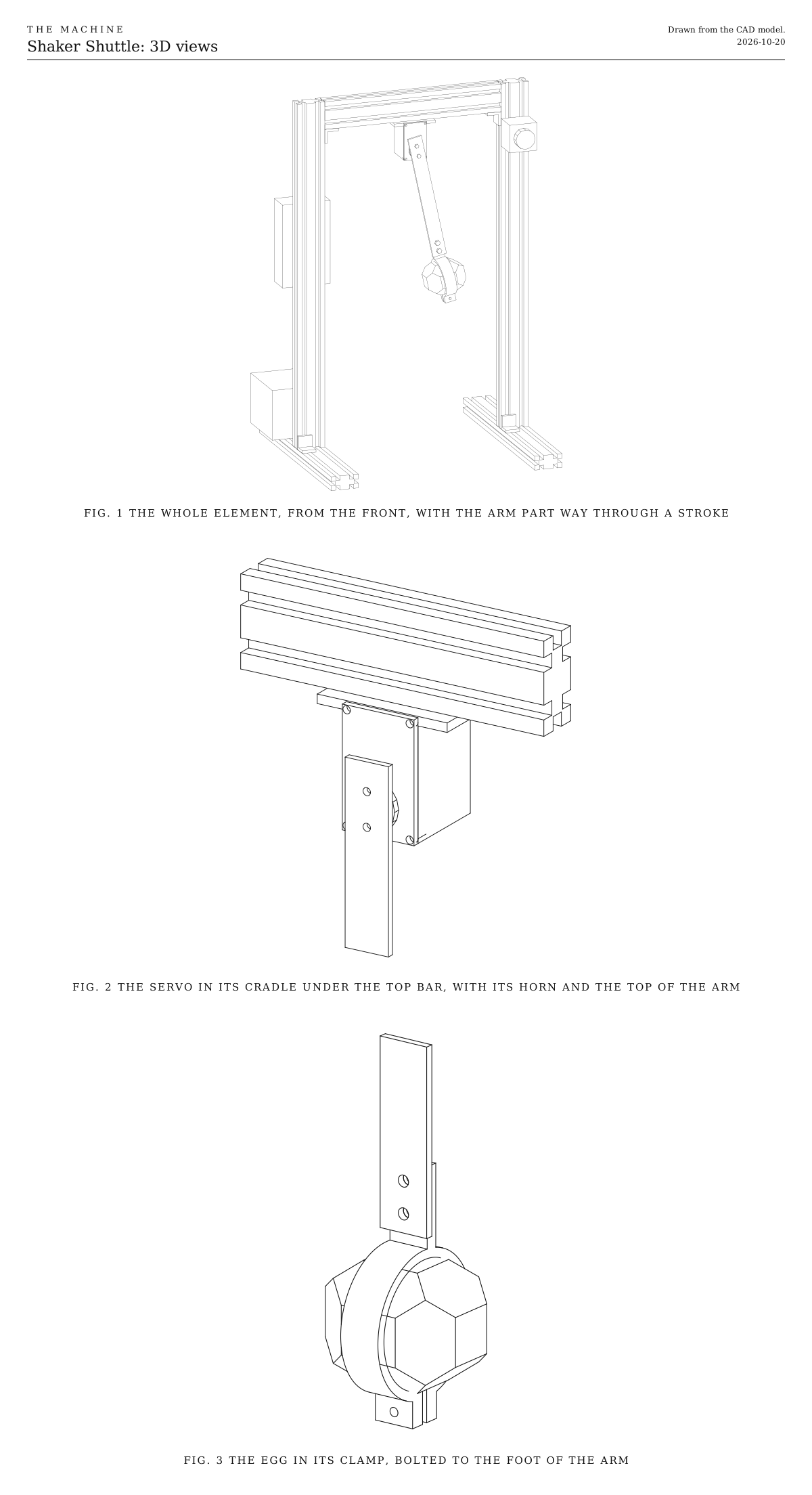
3D views. It shows the whole element from the front with the arm part way through a stroke, the servo in its cradle under the top bar, and the egg in its clamp at the foot of the arm. All three views are drawn from the CAD model.
Fig. 13D views. It shows the whole element from the front with the arm part way through a stroke, the servo in its cradle under the top bar, and the egg in its clamp at the foot of the arm. All three views are drawn from the CAD model.

How it works

  • A shaker egg hangs on the foot of an aluminum arm, 190 mm below a bus servo under the top bar of a small V-slot frame. The arm swings side to side, in the plane facing the audience. We started with an egg; the choices below cover the alternatives.
  • The sound is the stop. Inside the egg, the fill rides against one end while the egg moves. When the egg stops, the fill keeps going and hits the other end. A fast stroke with a hard stop slams it, which is loud. A slow stroke that eases into its stop lets the fill catch up gently, which is soft.
  • Every stroke is told what to do. Each step of the pattern carries a loudness, and the ESP32 turns it into a stroke: how far, how fast and how sharply it stops. A bus servo takes all three with each move, which a plain hobby servo can’t.
  • It alternates by itself. Each step is one stroke, right or left in turn. So a groove of loud strokes forward and soft ones back is a pattern of sixteenths, loud on the eighths and soft between. A backbeat is loud on 2 and 4.
  • Loud strokes are quick. A loud stroke of 8 degrees either way takes about 45 ms and reaches about 1.5 m/s at the egg. A soft one takes about 0.13 s and eases in.
  • It starts early, so it lands on time. The sound comes just after the stop, once the fill has crossed the egg. That’s about 15 ms after a hard stop and 30 ms after a soft one. So each stroke starts early by its own length plus that. The shared signal sends every step about a second ahead.
  • It knows where it is. The servo reports its own position, so it finds the middle on start with no sensor, and the code can check every stroke happened.
  • Rests are still. The arm waits where its last stroke ended. If the next note asks for the same direction again, the arm eases back during the rest, slowly enough that the fill barely stirs.
  • An ESP32-S3 listens for the shared wireless signal and talks to the servo through a small adapter board. It runs from the shared power-tool battery, with a converter bringing the servo’s supply down to 12 V.

Ways to play

  • Play the groove. Sixteenths, with loud strokes on the eighths and soft ones between.
  • Accent the backbeat. Make 2 and 4 loud and everything else a ghost stroke.
  • Swell. Raise the loudness step by step over a bar, and the strokes grow from a whisper to a slam.
  • Stop dead. A rest is silence, since nothing moves.

Notes

  • This is a first design. Expect one round of fitting.
  • The strokes in the 3D model are drawn from their profiles, not simulated. The fill inside the egg isn’t shown.
  • The servo is drawn from its published outline, with its shaft 10.5 mm from one end. Measure yours before printing the cradle; the sizes are at the top of the CAD script.
  • The firmware in the downloads is a first version. It compiles, and its timing is tested on a computer, but it hasn’t yet run on a built element. It listens for Control, the one broadcast signal every element hears, and until there’s a bridge to send it, its bench console plays the notes.
  • Costs in the parts list are rough estimates for budgeting, not checked prices. They add up the version we started with.

References

Parts

Ingredients

KindPartQtySourceEachFile
PrintedServo cradle, holds the servo under the top bar1··STL
PrintedServo clip, pins the servo in the cradle1··STL
PrintedEgg clamp, grips the egg and bolts to the foot of the arm1··STL
BoughtWaveshare ST3215-HS bus servo, 12 V, with its aluminum hornYour choice: see The servo1Link$22.00
BoughtWaveshare Bus Servo Adapter (A)It turns the ESP32's serial pins into the servo's one-wire bus, and carries the servo's power to it.1Link$7.00
BoughtShaker eggYour choice: see The shakerThey're usually sold in pairs.1·$3.00
BoughtAluminum flat bar, 20 x 3 mm, 200 mm longYour choice: see How long the arm isCut to about 178 mm for the arm we started with.1·$3.00
BoughtSelf-adhesive foam strip, about 1.5 mm thickIt lines the clamp, so the egg is gripped all round.1·$2.00
BoughtBuck converter, adjustable, up to 5 A, set to 12 VIt takes the battery down to the servo's 12 V. The servo can draw about 2.4 A when it's stopping hard.1·$6.00
BoughtESP32-S3 development board1·$8.00
BoughtBattery adapter for the shared power-tool platform, and a 5 V buck converterThe servo's 12 V converter runs from the battery, through the fuse, the stop button and the relay. The ESP32 takes 5 V.1·$15.00
BoughtThe listener parts every element carries, as on the Control pageThese are a blade fuse holder and 3 A fuse, a latching stop button with a spare contact, the status light, the number switches and their resistors. The stop switch under Choices has a plain two-pole switch in place of the stop button.1Link$12.00
BoughtMomentary push button, normally open, for the test buttonA short press plays each note once, and a long press relearns what the element can by itself. Any small panel button that closes while it's pressed will do.1·$1.00
BoughtRelay module, 5 V, high-level trigger, contacts rated 10 AIt's the switch the servo's power goes through, as on the other elements.1·$2.00
BoughtSmall project box, for the electronicsYour choice: see The electronics1·$5.00
BoughtAluminum extrusion, 20 x 40 mm V-slot, 500 mm, for the posts2·$9.00
BoughtAluminum extrusion, 20 x 40 mm V-slot, 300 mm, for the feet2·$6.00
BoughtAluminum extrusion, 20 x 40 mm V-slot, 260 mm, for the top bar1·$5.00
BoughtCorner brackets for 20 mm V-slot, with screws and T-nutsTwo join each post to its foot, and one holds each end of the top bar.6·$1.00
BoughtRubber feet, self-adhesiveUnder the feet, so a hard stroke doesn't walk the frame across the floor.4·$0.50
BoughtM5 screws, T-nuts and washers, assortedThe cradle, the electronics box, the stop button and the battery adapter.1·$5.00
BoughtM3 and M4 screws and nuts, and heat-set insertsFour M3 inserts for the cradle. M3 screws for the clip, the horn and the clamp; two M4 screws and nuts for the clamp's tab.1·$4.00
Total$138.00

Tools

  • 3D printer, PETG
  • Hex keys, 2, 2.5, 3 and 4 mm
  • Soldering iron, for the heat-set inserts and the wiring
  • A drill, with bits to suit the horn's screws and 4.5 mm
  • A hacksaw and a file, for the bar
  • A multimeter, to set the converters and check the adapter
  • A computer with a USB cable, to load the firmware and set the servo's middle
  • A phone, to film the strokes with sound

Choices

Decisions that are yours to make. Where we started is the version in the 3D model and the ingredients: a starting point, not the right answer.

The shaker

What does the arm hold?

A shaker eggWhere we started

SoundA short, soft chk, the classic egg

Eggs are cheap and light, so the servo stops them hardest. The fill has only a short way to fly, so every hit is tight.

A metal tube shaker, 15 to 20 cm

SoundBright, long and loud, with a sizzle along the stroke as the fill slides

The fill flies farther, so each hit is longer and comes a little later after the stop. It's heavier, which softens the hardest stops, and the clamp needs resizing for the tube.

A wood or bamboo shaker

SoundWarm, dry and woody

It sits between the other two for weight. Clamp it at its middle, so it doesn't twist on the arm.

One you make yourself

SoundWhatever its fill gives. The Jar Flipper's list of fills applies here too.

Use a small tube or pill bottle and fill it only half full, so the fill has room to fly across.

The clamp grips the egg round its middle. EGG_R at the top of the CAD script resizes it for another shaker.

The servo

What swings the arm?

Waveshare ST3215-HS bus servo, 12 VWhere we started

SoundA short gear whir on each stroke

Each move can be given its own speed and how sharply it starts and stops, which is what accents need. It reports where it is, so it finds the middle by itself, with no sensor. It turns 60 degrees in about 0.09 s.

Waveshare ST3215, the standard one

SoundA lower whir

It's stronger, at 30 kg.cm, but takes 0.22 s for 60 degrees, so its hardest strokes are gentler. It suits a heavy tube shaker.

A digital hobby servo

SoundA buzzier whine, and a hum while it holds still

It's cheap, and bought metal brackets fit it. It can be told only where to go, not how fast, so soft strokes have to be drawn as many small steps, which comes out coarse. It doesn't report where it is, and it needs its own cradle.

How long the arm is

How far below the servo's shaft does the egg hang?

Short, about 120 mm

SoundTighter and quieter

The egg moves less for each degree, so the same stroke is softer. The servo works least.

About 190 mmWhere we started

SoundA full chk without a wide swing

At the speed we started with, a loud stroke reaches about 1.5 m/s at the egg with only 8 degrees either way.

Long, about 260 mm

SoundThe loudest, and a big swing to watch

More weight at the end of a longer lever means the servo can't stop it as sharply. A thicker bar keeps the arm from springing at a hard stop.

Cut the bar to the length you pick. The frame has room for the egg down to about 260 mm.

The stop switch

What cuts the servo's power at the element?

Latching emergency-stop button, with a spare contactWhere we started

The red mushroom head anyone nearby knows to hit. It stays down until it's twisted to release, so the element can't start again by accident. Its main contact cuts the power and its spare contact tells the ESP32. About $8.

Two-pole power switch, a rocker or a toggle

Smaller, plainer and cheaper, about $2. One pole cuts the power and the other tells the ESP32, so it does the same job. It doesn't read as a stop to someone who doesn't know the Machine, and it switches back on as easily as off. Rate its contacts above what the element draws, as the button's are.

Keep the second pole either way. It tells the ESP32 the power was cut, so it reads where the arm is and eases it to the middle, rather than jumping when the power comes back, as after a stop from the Bridge. Either way the relay stays, since it's how a stop from the Bridge reaches the element when no one is at it. A two-pole switch wires as the button does: one pole in place of the main contact, from 11 to 12, and the other in place of the spare contact, from 13 to 14.

Print

Material
PETG
Layers
0.2 mm
Walls
4
Infill
40%

Every part fits a 150 mm bed and prints without supports. The cradle's floor bridges the servo's pocket, which PETG manages at this size. Print the cradle first and try your servo in it before printing the rest.

The printed parts

  • Servo cradle, holds the servo under the top bar

    Which way up
    Its flange flat on the bed, the pocket open to one side
    Supports
    None
    Time
    About 2 hours

    Four M3 heat-set inserts go into its front corners, for the clip.

    STL ↓
  • Servo clip, pins the servo in the cradle

    Which way up
    Flat
    Supports
    None
    Time
    About 15 minutes
    STL ↓
  • Egg clamp, grips the egg and bolts to the foot of the arm

    Which way up
    On its side, with the ring flat on the bed
    Supports
    None
    Time
    About 45 minutes

    An M3 nut sinks into one ear, and two M4 nuts into the back of the tab.

    STL ↓

Assembly

  1. 1

    Join each post to its foot with two corner brackets, one in front and one behind, with the post's wide face toward the audience.

  2. 2

    Fit the top bar between the tops of the posts, standing on its narrow edge and flush with their tops, with a bracket under each end. Stick a rubber foot under each end of each foot.

    CheckThe frame stands square and doesn't rock on a flat floor.

  3. 3

    Print the cradle first and try the servo in it.

    TrickyThe cradle is drawn from the servo's published outline, 45.2 x 24.7 x 35 mm. Measure yours before printing. If it's loose, a turn of tape round the servo takes up the gap.

    CheckThe servo slides in from the front with a firm push, and doesn't rattle.

  4. 4

    Melt four M3 heat-set inserts into the cradle's front corners.

  5. 5

    Set the servo to the middle of its turn before fitting the horn. On the bench, plug the servo into the adapter with its jumper on B, plug the adapter into a computer, and send the servo to position 2048 of 4096 with Waveshare's or Feetech's free servo tool. Then move the jumper back to A. Once everything is wired, the firmware's center command does the same.

    CheckFitted at the middle, the horn's screw holes line up straight up and down.

  6. 6

    Slide the servo into the cradle, shaft to the front, with its cable out of the slot behind or below. Screw the clip over it.

    CheckPushed and pulled by its shaft, the servo doesn't move in the cradle.

  7. 7

    Bolt the cradle under the middle of the top bar, with two M5 screws up through its flange into T-nuts in the bar's lower slot.

    CheckThe servo's shaft sits halfway between the posts and points straight at the audience.

  8. 8

    Cut the bar to length, 178 mm where we started. Hold the horn on its top end and mark through two of the horn's holes, mark two holes for the clamp's tab at the foot, and drill all four.

    TrickyCenter the horn's holes on the bar's width, with the shaft 20 mm down from the top, or the arm hangs crooked. File off the burrs so the bar sits flat on the horn.

  9. 9

    Fit the horn on the servo's shaft with its center screw, and screw the bar to the horn.

  10. 10

    Line the clamp with foam strip and close it round the egg's middle with the M3 screw, so the egg's long axis runs across the clamp. Bolt the clamp's tab to the foot of the bar with two M4 screws, their nuts in the back of the tab.

    CheckShaken hard by hand, the egg doesn't turn or slip. Swung gently by hand with the power off, the egg clears the posts both ways.

  11. 11

    Wire it in the box on the back of the left post, following the wire list under Wiring. The fuse comes first, then the 5 V converter for the ESP32, and the stop button and the relay for the servo's 12 V converter. Join all the grounds.

    TrickySet both converters with a multimeter before anything is connected to them, 5.0 V for the ESP32 and 12.0 V for the servo. Most come set higher. More than about 6 V destroys the ESP32, and more than 12.6 V can destroy the servo.

    CheckWith the battery in and no code running, the ESP32's light is on. Press the stop button, release it, and the servo stays limp.

  12. 12

    Before the adapter's RX wire goes onto the ESP32, power the adapter and measure its TX and RX pins against its GND.

    TrickyWaveshare doesn't say what voltage these pins use. If either reads about 5 V, put a logic level converter between the adapter and the ESP32. A 5 V signal on an ESP32-S3 pin can destroy it.

    CheckBoth read about 3.3 V or less.

  13. 13

    Load the firmware from the downloads with the Arduino environment for ESP32, and open its serial monitor at 115200 baud, as its README says. Type servo to see that it answers. Then type hang, let the arm come to rest straight down, type middle, and save. Try play 0 127 for a loud stroke and play 0 20 for a soft one.

    CheckA loud stroke ends in one sharp chk, and the arm stops dead without springing back. A soft one eases in and barely rustles.

  14. 14

    Film the shaker with sound. For a loud stroke and a soft one, measure from the moment the arm stops to the moment the egg sounds. Type them in with set lead loud and set lead soft, in milliseconds, then save.

    CheckPlayed to the bridge's beat, every stroke sounds on it, loud or soft.

Wiring

The fuse comes first, right after the battery. The ESP32-S3 runs from the 5 V converter. The servo's power goes through the stop button and then the relay, so either one cuts it, and only then through the 12 V converter. The servo's one cable carries its power and its signal from the adapter board. The status light, the number switches and the battery reading are wired the same way on every element, so they're on the Control page, not here.

Wiring · Shaker Shuttle
PowerSignalGround, all joinedPins drawn faint are left empty.

Wire list

  1. Battery adapter, +

    Fuse, 3 A, in

    PowerRed, 16 AWG

    Keep it as short as the adapter allows. Nothing connects ahead of the fuse.

  2. Fuse, 3 A, out

    5 V converter, IN+

    PowerRed, 22 AWG

  3. Fuse, 3 A, out

    Stop button, 11

    PowerRed, 18 AWG

  4. Stop button, 12

    Relay module, COM

    PowerRed, 18 AWG

    The stop button's main contact opens when pressed, cutting the servo's power itself, so a program that hangs can't ignore it.

  5. Relay module, NO

    12 V converter, IN+

    PowerRed, 18 AWG

  6. 12 V converter, OUT+

    Bus Servo Adapter (A), PWR+

    PowerRed, 18 AWG, into the adapter's green terminal

    Connect it only once the converter is set to 12.0 V.

  7. Bus Servo Adapter (A), SERVO +

    ST3215-HS servo, +

    PowerThe servo's own cable

    One three-wire cable from the adapter's servo port carries the power, the ground and the signal.

  8. 5 V converter, OUT+

    ESP32-S3 board, 5V

    PowerRed, 22 AWG

    Connect it only once the converter is set to 5 V.

  9. 5 V converter, OUT+

    Relay module, VCC

    PowerRed, 22 AWG

  10. Battery adapter, −

    5 V converter, IN−

    GroundBlack, 22 AWG

  11. Battery adapter, −

    12 V converter, IN−

    GroundBlack, 18 AWG

  12. 12 V converter, OUT−

    Bus Servo Adapter (A), PWR−

    GroundBlack, 18 AWG, into the adapter's green terminal

  13. Bus Servo Adapter (A), SERVO −

    ST3215-HS servo, −

    GroundThe servo's own cable

  14. 5 V converter, OUT−

    ESP32-S3 board, GND

    GroundBlack, 22 AWG

  15. Bus Servo Adapter (A), GND

    ESP32-S3 board, GND

    GroundBlack, 22 AWG

    It's the serial header's ground, so the ESP32 and the adapter agree on what the signals mean.

  16. Relay module, GND

    ESP32-S3 board, GND

    GroundBlack, 22 AWG

  17. Resistor, 10 kΩ, 2

    ESP32-S3 board, GND

    GroundThe resistor's own leg

  18. Stop button, 14

    ESP32-S3 board, GND

    GroundBlack, 22 AWG

  19. Test button, 2

    ESP32-S3 board, GND

    GroundBlack, 22 AWG

  20. Stop button, 13

    ESP32-S3 board, GPIO 4

    SignalAny color, 22 AWG

    It's the stop button's spare contact, so the ESP32 knows it's been pressed.

  21. Test button, 1

    ESP32-S3 board, GPIO 14

    SignalAny color, 22 AWG

    The test button. The ESP32's own pull-up holds the pin high until it's pressed, so nothing else goes on this pin.

  22. ESP32-S3 board, GPIO 5

    Relay module, IN

    SignalAny color, 22 AWG

  23. Resistor, 10 kΩ, 1

    Relay module, IN

    SignalThe resistor's own leg

    Holds the relay off while the ESP32 starts, when its pins float.

  24. ESP32-S3 board, GPIO 17

    Bus Servo Adapter (A), TX

    SignalAny color, 22 AWG

    The adapter's serial pins are named for the board they meet, so TX goes to TX and RX to RX, as Waveshare's guide says. If the servo doesn't answer, swap the two; it does no harm.

  25. Bus Servo Adapter (A), RX

    ESP32-S3 board, GPIO 18

    SignalAny color, 22 AWG

    Measure this pin's voltage before connecting it. See the notes below.

  26. Bus Servo Adapter (A), SERVO DATA

    ST3215-HS servo, DATA

    SignalThe servo's own cable

Get these right

Set the converters first
Most converters come set higher than you need. With the battery in and a multimeter on each output, turn the 5 V converter's screw to 5.0 V and the 12 V one to 12.0 V, and only then connect the ESP32 and the adapter. More than about 6 V destroys the ESP32, and the ST3215-HS takes no more than 12.6 V.
Check the adapter's serial pins
Waveshare doesn't say what voltage the adapter's TX and RX pins use. With it powered, measure each against its GND. About 3.3 V is safe. If either reads about 5 V, put a logic level converter between the adapter and the ESP32, or the 5 V will reach the ESP32-S3 and can destroy it.
The adapter's jumper
On A, the adapter listens to the serial header, for the ESP32. On B, it listens to its USB port, for a computer setting up the servo. It has to be on A to play.
The servo's number
Every bus servo answers to its own number on the bus. They leave the factory as 1, and the code expects 1. A second servo on the same bus needs its number changed first, with the same tool that sets the middle.
Never unplug the servo with power on
Press the stop button first. Plugging a bus servo in live can spike its supply.
The pins
Any free ESP32-S3 pins will do, except 0, 3, 45 and 46, which the board reads as it starts, 19 and 20, which are its USB port, and 35 to 37 on boards with eight megabytes of extra memory (marked R8). The serial port can use almost any pair. The pins here leave 1 and 6 to 15 free for the status light, the number switches, the test button and the battery reading. If you use others, change them at the top of the firmware.

Mounting

Everything fixes to the V-slot frame with T-nuts and screws, so any part can slide to a new place or come off with a hex key. The servo, its cradle, the arm and the egg come off as one piece with two screws.

The frame
Two posts of 20 x 40 mm V-slot stand on two feet, with their wide faces to the audience. A top bar of the same, standing on its narrow edge, joins their tops.
The servo
It sits in its printed cradle under the middle of the top bar, held by two M5 screws in T-nuts in the bar's lower slot. It slides along the slot to move the swing off center.
The arm
It hangs from the servo's horn, and nothing else touches it. The egg's clamp bolts to its foot.
The electronics
The box sits on the back of the left post, on two T-nuts. The servo's cable runs to it along the top bar's back slot and down the post.
The stop button
It sits in its own housing on the front of the right post, near the top, where a hand finds it without reaching into the swing.
The battery
The adapter sits on the left foot, behind the post, so the pack slides on and off without moving anything else.

The electronics

Hidden in a box, or on show?

Closed boxWhere we started

A small project box, bought or printed, bolts to the post. It's tidy and protected, but it hides the electronics.

Open plate

The boards sit on standoffs on a flat plate on the post, with the wires dressed along the slot. The electronics become part of the look. It wants neat wiring, and nothing guards it from knocks.

DIN rail

A short length of 35 mm DIN rail goes on T-nuts, with each board in a snap-on holder. It looks like a control panel, and any board comes off with a flick. The holders add a few dollars.

Whichever you pick, keep the stop button on the outside, where anyone can reach it.

Tuning

Tuning

The test button
A short press plays each of its notes once, starting about a second after you let go: a stroke the other way from the last, one to the audience's right, then one to the left. Hold it for two seconds and it reads where the arm is and eases it to the middle, as after a stop. It works only while the element is resting, with no Bridge in range or with the Bridge holding it silent. While it plays or is stopped, the button does nothing. A stop ends a test at once, and pressing again ends one early. The middle and the leads are still set at the console.
A rattle or a double hit after a loud stroke
The arm springs back at the hard stop, and the fill hits twice. Lower the stroke's acceleration a step, so the servo stops a few milliseconds less sharply. Check the horn's screws and the clamp are tight, since any play makes it worse.
Soft strokes still too loud
Make them smaller as well as slower, and ease into the stop. A fill that slides, like rice or seeds, goes nearly silent below a certain stop. Beads and steel always roll, so they never quite go quiet.
Accents not loud enough
Swing farther, or run faster. 8 degrees either way at the speed we started with reaches about 1.5 m/s, and the servo has more to give. A longer arm or a heavier fill helps too.
The hits are early or late against the beat
The lead changes with loudness. The fill lands about 15 ms after a hard stop and about 30 ms after a soft one, in an egg. Measure it again after changing the shaker, the arm or the fill.
Strokes fall behind at fast tempos
A loud stroke takes about 45 ms, but a soft one takes about 0.13 s to ease in. Above about 110 beats a minute in sixteenths, make the soft strokes shorter, or let them be a little louder.
The frame walks or shakes
Every hard stroke pushes the frame sideways. Check the rubber feet, put a weight on each foot, or bolt them down.
The servo whirs
That's its gears. Shorter strokes whir less, and a shaker in a full room covers it. A slower servo with taller gearing whirs lower.
The servo gets warm
A hanging arm needs no force to hold it at the middle. In long rests, park the arm hanging straight down, or turn the servo's torque off and let it hang.
The egg slips in the clamp
Add a second layer of foam, or tighten the clamp's screw a little more. An egg that turns in the clamp smears every hit.
Variations

Two eggs
A wider clamp holds two eggs side by side, the way a player holds two in one hand. The sound is fuller, and the two never land quite together.
Toward the audience
Turn the servo so its shaft points across the stage, and the egg swings forward and back like a player's hand. From the front it reads as a nod. The cradle sits on a short cross piece of 20 x 20 mm V-slot under the top bar.
A twist
A second small servo at the foot of the arm turns the egg on its long axis between strokes, the wrist roll shaker players use for a softer, rolling sound.
The rail
A carriage on V-slot wheels, pulled by a belt and a NEMA 17 like the Gantry Pendulum's drive, carries the shaker in straight strokes. It allows longer strokes and any speed profile, with a stepper's exact timing, at the cost of more parts.
A quick-return crank
A motor turning at a steady speed drives a crank whose shape makes the forward stroke faster than the return. Every forward stroke is loud and every return is soft, with no pattern to program, only a tempo.
An upright arm
Put the servo low and raise the egg, like a hand. With the power off the arm falls to one side, so give it soft stops to land on.