Skip to content

The Machine · Control

Set List

Design stage

Updated 2026-10-20

A button for each piece. Press one and the ensemble moves into that song from the next bar line, so the order is chosen live.

Loading the model

Drag to turn · scroll to zoom

Printed

3DThe Set List. Printed parts are drawn in orange; everything else is bought.

Overview

Cost, roughly
About $90
Printing
About 30 hours, in five prints
Building
A weekend
Difficulty
Moderate
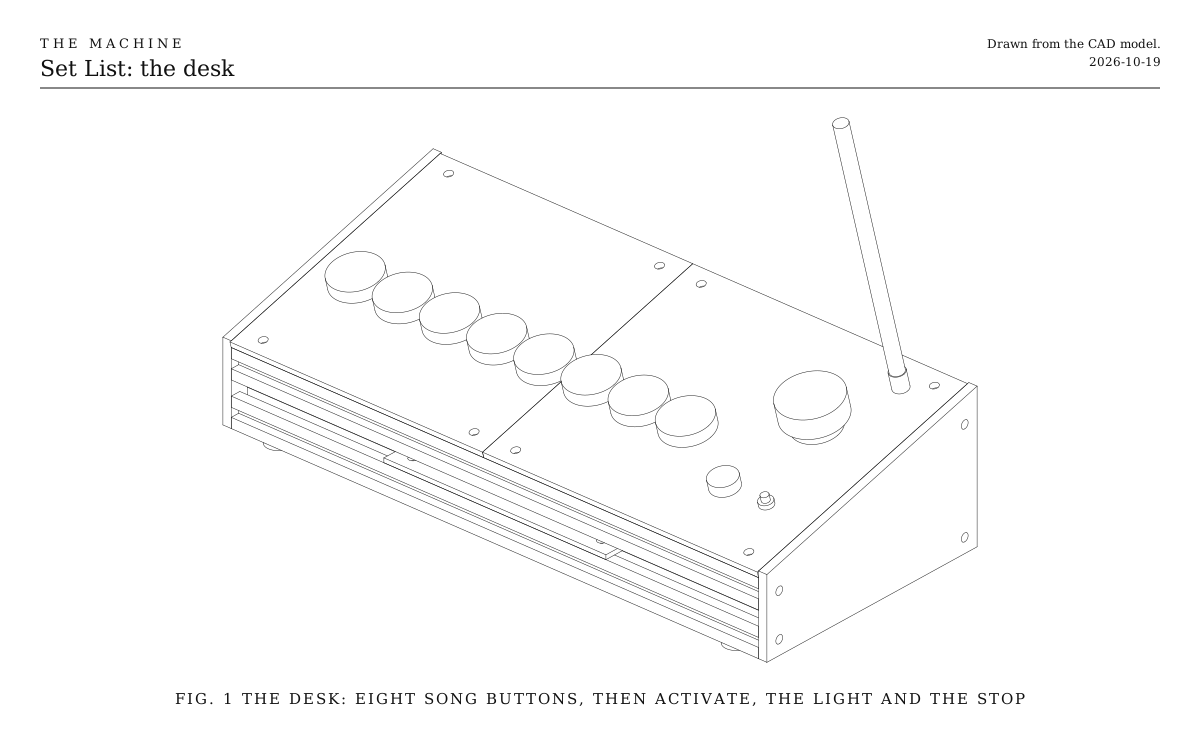
The desk. Eight song buttons in a row, then activate, the light and the stop. Drawn from the CAD model.
Fig. 1The desk. Eight song buttons in a row, then activate, the light and the stop. Drawn from the CAD model.

How it works

  • Each button holds one piece, stored on the bridge from its first cue to its last.
  • Pressing one starts that piece at the next bar line. Pressing another moves on, so the set can follow the room.
  • The buttons light up to show what’s playing and what’s already been played.
  • Whoever chooses is still a technician: the pieces are written, and only their order is live.
  • The bridge’s board, stop button, activate button, light and antenna are built into the desk, so there’s one thing to carry and one cable.

Parts

Ingredients

KindPartQtyEachFile
PrintedPanel, left tileYour choice: see The panel1·STL
PrintedPanel, right tileYour choice: see The panel1·STL
PrintedCheek, left1·STL
PrintedCheek, right1·STL
PrintedTray for the electronics1·STL
Bought2020 V-slot extrusion, 380 mmThe four rails across the desk. Cut square, so the cheeks sit flat.4$4.00
BoughtThe bridge's parts, without its boxEverything on the Bridge's parts list except the printed box: the ESP32-S3 board, antenna and lead, stop button, activate button, light, resistors and cable.1$45.00
BoughtLit arcade buttons, 30 mm, with 5 V lightsYour choice: see The buttons8$1.50
BoughtMCP23017 I/O expander boardReads the eight buttons and drives their lights, on two wires.1$3.00
BoughtULN2803 driver, on a small board or a socketSwitches the eight 5 V lights from the expander's 3.3 V pins.1$2.00
BoughtM5 x 16 screwsThrough the cheeks into the rails' tapped ends.8$0.30
BoughtM5 x 10 screws and T-nutsThe panel tiles and the tray onto the rails.12$0.30
BoughtWhite artist's tapeYour choice: see The labelsWritten on, above each button.1$5.00
BoughtStick-on rubber feet4$0.25
Total$90.00

Tools

  • A computer with USB, and the Arduino environment for ESP32
  • 3D printer, PETG
  • M5 tap, for the rails' ends
  • Hex keys, 2.5 and 3 mm
  • Soldering iron
  • Multimeter

Choices

Decisions that are yours to make. Where we started is the version in the 3D model and the ingredients: a starting point, not the right answer.

The buttons

What do the songs feel like under the hand?

30 mm lit arcade buttonsWhere we started

A short, clicky press, and the one that's playing glows. Cheap, and eight fit in a row with room to spare.

60 mm lit domes

Big and deliberate, each song an event. Only five or six fit this desk, so make it wider, or the set shorter.

Lamps and toggle switches

A row of chrome toggles under little pilot lamps, like an old studio desk. Each song is flicked on rather than pressed. A switch left up has to be read as "this one".

The labels

How do the songs get their names?

Written on tapeWhere we started

White artist's tape above each button and a marker. Rewritten for every show in seconds.

Slide-in cards

A printed holder above each button that takes a small card. Neater, and a set list can be printed and swapped in.

Nothing written

The order is only in the performer's head, and the audience sees bare lit buttons.

The panel

What is the top made of?

Two printed tilesWhere we started

In the same orange as every printed part, and any change to the layout is a new print.

One sheet of plywood

A single 6 mm sheet, cut and drilled to the tiles' outline. Warm and plain, no seam, and a drill or laser cutter instead of a printer.

Aluminum sheet

2 mm, drilled. Looks like test equipment, and stays flat and stiff over the whole width.

Print

Material
PETG
Layers
0.2 mm
Walls
4
Infill
25%

Every part prints flat and fits a 220 mm bed. Measure your buttons first: snap-in 30 mm buttons want a 30 mm hole, the screw-in kind 28 mm. The hole size is at the top of the Set List's script.

The printed parts

  • Panel, left tile

    Which way up
    Top face down
    Supports
    None
    Time
    About 7 hours
    STL ↓
  • Panel, right tile

    Which way up
    Top face down
    Supports
    None
    Time
    About 8 hours
    STL ↓
  • Cheek, left

    Which way up
    Flat on its outside face
    Supports
    None
    Time
    About 5 hours
    STL ↓
  • Cheek, right

    Which way up
    Flat on its outside face
    Supports
    None
    Time
    About 5 hours
    STL ↓
  • Tray for the electronics

    Which way up
    Flat
    Supports
    None
    Time
    About 5 hours
    STL ↓

Assembly

  1. 1

    Tap the centre hole at both ends of each rail M5.

    TrickyGo straight and slowly, backing the tap out every turn. A crooked thread tilts the cheek and the whole desk twists.

  2. 2

    Slide two T-nuts into the top slot of each top rail, and two into each bottom rail for the tray.

    TrickyT-nuts can't get into a slot once both cheeks are on, so put them all in now.

  3. 3

    Screw the four rails to the left cheek, then the right, with the M5 x 16 screws.

    CheckThe desk stands without rocking, and the top rails line up with the cheeks' slope.

  4. 4

    Screw the tray onto the bottom rails, and strap the board, the expander and the driver to it with zip ties.

  5. 5

    Push the eight song buttons, the stop button, the activate button and the light holder into the panel tiles, and bolt the antenna connector through its hole.

  6. 6

    Wire everything as in the Wiring tab.

  7. 7

    Screw the two tiles onto the top rails, and plug the USB cable into the board's port marked USB.

    CheckWith the bridge's firmware loaded, the light is solid red when it's switched on, as the bridge always starts.

  8. 8

    Stick the four feet under the bottom rails, and write the songs on tape above their buttons.

Wiring

The stop button, activate button, light and antenna are wired exactly as on the Bridge, to the same pins. Here are the Set List's own parts: the expander reads all eight buttons on two wires, and the driver lights them. The board runs from its USB cable; at full brightness the eight lights draw about 150 mA from its 5 V pin.

Wiring · Set List
PowerSignalGround, all joinedPins drawn faint are left empty.

Wire list

  1. ESP32-S3 board, 3V3

    MCP23017 expander, VCC

    PowerAny hookup wire

  2. ESP32-S3 board, 3V3

    MCP23017 expander, RESET

    PowerAny hookup wire

    Held high, or the expander keeps resetting.

  3. ESP32-S3 board, GND

    MCP23017 expander, GND

    GroundAny hookup wire

  4. ESP32-S3 board, GND

    MCP23017 expander, A0

    GroundAny hookup wire

    A0, A1 and A2 all to ground, so the expander answers at its first address.

  5. ESP32-S3 board, GND

    MCP23017 expander, A1

    GroundAny hookup wire

  6. ESP32-S3 board, GND

    MCP23017 expander, A2

    GroundAny hookup wire

  7. ESP32-S3 board, GPIO 8

    MCP23017 expander, SDA

    SignalAny hookup wire

  8. ESP32-S3 board, GPIO 9

    MCP23017 expander, SCL

    SignalAny hookup wire

  9. MCP23017 expander, GPA0

    Song buttons, 1 to 8, Switch 1

    SignalAny hookup wire

    The expander's pull-ups hold each pin high; a press pulls it to ground. GPA1 to GPA7 go to switches 2 to 8 the same way.

  10. MCP23017 expander, GPA1

    Song buttons, 1 to 8, Switch 2

    Signal

  11. MCP23017 expander, GPA2

    Song buttons, 1 to 8, Switch 3

    Signal

  12. MCP23017 expander, GPA3

    Song buttons, 1 to 8, Switch 4

    Signal

  13. MCP23017 expander, GPA4

    Song buttons, 1 to 8, Switch 5

    Signal

  14. MCP23017 expander, GPA5

    Song buttons, 1 to 8, Switch 6

    Signal

  15. MCP23017 expander, GPA6

    Song buttons, 1 to 8, Switch 7

    Signal

  16. MCP23017 expander, GPA7

    Song buttons, 1 to 8, Switch 8

    Signal

  17. ESP32-S3 board, GND

    Song buttons, 1 to 8, Switches common

    GroundOne wire daisy-chained across all eight switches' other legs

  18. MCP23017 expander, GPB0

    ULN2803 driver, IN1

    SignalAny hookup wire

    GPB1 to GPB7 go to IN2 to IN8 the same way.

  19. MCP23017 expander, GPB1

    ULN2803 driver, IN2

    Signal

  20. MCP23017 expander, GPB2

    ULN2803 driver, IN3

    Signal

  21. MCP23017 expander, GPB3

    ULN2803 driver, IN4

    Signal

  22. MCP23017 expander, GPB4

    ULN2803 driver, IN5

    Signal

  23. MCP23017 expander, GPB5

    ULN2803 driver, IN6

    Signal

  24. MCP23017 expander, GPB6

    ULN2803 driver, IN7

    Signal

  25. MCP23017 expander, GPB7

    ULN2803 driver, IN8

    Signal

  26. ESP32-S3 board, 5V

    Song buttons, 1 to 8, Lights +

    PowerOne wire daisy-chained across all eight lights' + legs

  27. ESP32-S3 board, 5V

    ULN2803 driver, COM

    PowerAny hookup wire

  28. ULN2803 driver, OUT1

    Song buttons, 1 to 8, Light 1 −

    SignalAny hookup wire

    OUT2 to OUT8 go to lights 2 to 8 the same way.

  29. ULN2803 driver, OUT2

    Song buttons, 1 to 8, Light 2 −

    Signal

  30. ULN2803 driver, OUT3

    Song buttons, 1 to 8, Light 3 −

    Signal

  31. ULN2803 driver, OUT4

    Song buttons, 1 to 8, Light 4 −

    Signal

  32. ULN2803 driver, OUT5

    Song buttons, 1 to 8, Light 5 −

    Signal

  33. ULN2803 driver, OUT6

    Song buttons, 1 to 8, Light 6 −

    Signal

  34. ULN2803 driver, OUT7

    Song buttons, 1 to 8, Light 7 −

    Signal

  35. ULN2803 driver, OUT8

    Song buttons, 1 to 8, Light 8 −

    Signal

  36. ESP32-S3 board, GND

    ULN2803 driver, GND

    GroundAny hookup wire

Get these right

Power the expander from 3.3 V
Its pins connect straight to the ESP32's, and the ESP32's pins are destroyed by 5 V. Only the lights and the driver's COM pin take 5 V.

Mounting

The Set List is a slanted desk that stands on a table: four 2020 rails between two printed cheeks, with the panel on the top two rails and the electronics on a tray across the bottom two.

The rails
M5 x 16 screws through each cheek into the rails' tapped ends, four to a cheek.
The panel tiles
Two M5 x 10 screws each into T-nuts in the top slots of the two upper rails. The seam between them falls between the fifth and sixth buttons.
The tray
Four M5 x 10 screws into T-nuts in the two bottom rails. The boards are zip-tied to it.
The feet
Four stick-on rubber feet under the bottom rails, near the cheeks.
The cable
Out through the open back, between the rails.

The back

Open, or closed?

OpenWhere we started

The wiring shows from behind, and the cable leaves anywhere. Fine on a desk that faces the performer.

A back panel

A sheet of 3 mm plywood or a printed plate between the cheeks, screwed to the two back rails, with a notch for the cable. Tidier if the audience sees the back.

Tuning

Tuning

The lights
Bright enough to read at a glance, and no brighter. A dark room makes eight glowing buttons the brightest thing on stage; turn them down until they're a hint.
Moving on
A new song starts from the next bar line. If a song should only change at the end of a phrase, make it wait for the next four bars instead, and listen whether the change still feels like the press caused it.

Variations

Cues within a song
The Button beside the set list steps through each song's own cues, so a song can build in parts.
A longer desk
Each button needs about 34 mm. Twelve songs want a desk about 520 mm wide, with longer rails and a third panel tile.