Skip to content

The Machine · Control

The Button

Design stage

Updated 2026-10-20

One big button steps through a written piece: bring in the drums, lock at the next bar, start the teardown. The piece is stored on the bridge, so there's no computer on stage.

Loading the model

Drag to turn · scroll to zoom

Printed

3DThe Button. Printed parts are drawn in orange; everything else is bought. It's the bridge box, longer, with its own lid.

Overview

Cost, roughly
About $70
Printing
About 16 hours
Building
An evening
Difficulty
Moderate
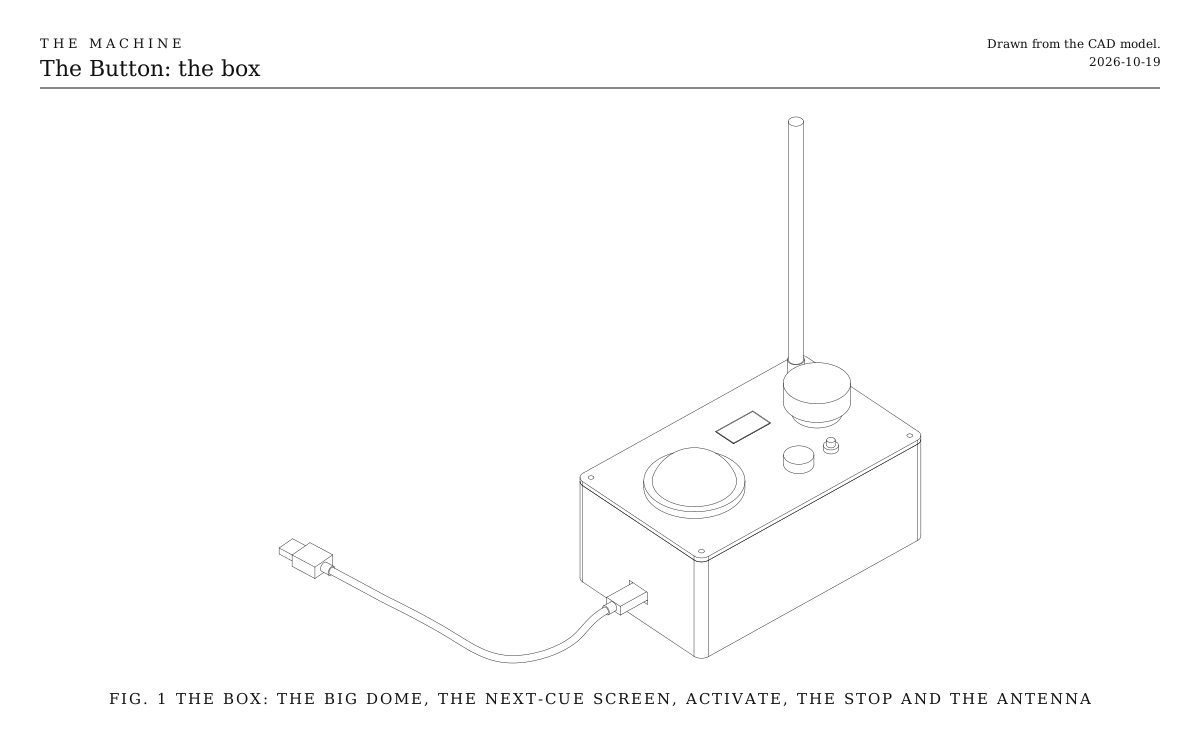
The box. The big dome at the cable end, then the next-cue screen, activate, the light, the stop and the antenna, with the USB cable to the computer. Drawn from the CAD model.
Fig. 1The box. The big dome at the cable end, then the next-cue screen, activate, the light, the stop and the antenna, with the USB cable to the computer. Drawn from the CAD model.

How it works

  • The piece is written beforehand as a list of cues and loaded onto the bridge over USB. Each cue is a set of changes: which elements play which rhythms, a new tempo, the lock.
  • Pressing the dome plays the next cue from the next bar line, so a press a little early or late never jumps mid-beat.
  • The screen beside the dome shows which cue comes next, and the dome’s light glows while one is waiting.
  • Whoever presses it is a technician, like a theatre’s stage manager calling the lights.
  • It’s the bridge box made longer: the same tub and lid, with the same stop button, activate button, light and antenna, and room for the dome. One box does both jobs.

Parts

Ingredients

KindPartQtyEachFile
PrintedBox tub: floor, walls, cable slot and zip-tie slots1·STL
PrintedBox lid: holes for the dome, stop, activate, light and antenna, and the screen's window1·STL
BoughtThe bridge's parts, without its boxEverything on the Bridge's parts list except the printed box: the ESP32-S3 board, antenna and lead, stop button, activate button, light, resistors and cable.1$45.00
BoughtLit dome button, 60 mmYour choice: see The big buttonWith a 5 V light inside. Most mount in a 28 mm hole.1$8.00
BoughtScreen, 1.3 inch, I2C, 128 x 64Your choice: see The screen1$8.00
BoughtLogic-level MOSFET switch moduleSwitches the dome's light from a 3.3 V pin.1$2.00
BoughtM3 heat-set inserts4$0.20
BoughtM3 x 10 screwsHold the lid on.4$0.10
BoughtZip tie and a strip of foam tapeHold the board to the floor.1$1.00
BoughtStick-on rubber feet4$0.25
Total$66.20

Tools

  • A computer with USB, and the Arduino environment for ESP32
  • 3D printer, PETG
  • Soldering iron
  • Multimeter

Choices

Decisions that are yours to make. Where we started is the version in the 3D model and the ingredients: a starting point, not the right answer.

The big button

What does the hand press?

A 60 mm lit domeWhere we started

Big enough to find without looking, with a light inside that can glow while a cue is waiting. Fits this box.

A 100 mm arcade button

The game-show button. Unmissable, and every press is seen from the back row. Wants a longer box and a 75 mm hole.

A foot pedal

A pedal on a cable into a 1/4 inch socket in the box's end, so whoever calls the cues has both hands free to carry elements. Nobody sees the press.

The screen

How does the operator know what comes next?

A small screenWhere we started

The next cue's name in plain words, and how many are left. Readable from arm's length in a dark room.

A big number

A four-digit LED display showing the next cue's number, bright and old-fashioned, read from across the stage. The cue list on paper says what each number is.

Nothing

The dome's light blinks the cue number. The simplest box, and the piece has to be known by heart.

Print

Material
PETG
Layers
0.2 mm
Walls
6 lines, the whole wall
Infill
20%

Holes print slightly small, and dome buttons vary. Measure yours before printing, and change the sizes at the top of the Button's script if they differ.

The printed parts

  • Box tub: floor, walls, cable slot and zip-tie slots

    Which way up
    Upright, open side up
    Supports
    None
    Time
    About 12 hours
    STL ↓
  • Box lid: holes for the dome, stop, activate, light and antenna, and the screen's window

    Which way up
    Top face down, so the lip is on top
    Supports
    None
    Time
    About 4 hours
    STL ↓

Assembly

  1. 1

    Print the tub upright and the lid top face down.

    CheckThe dome, stop button, activate button, light holder and antenna connector each fit their hole, and the screen's face sits in its window.

  2. 2

    Melt the four heat-set inserts into the tops of the corner posts with a soldering iron.

  3. 3

    Lay the board on a strip of foam tape between the two slots in the floor, toward the stop end, and strap it down with a zip tie through the slots.

    TrickyKeep the board clear of the dome's end of the box. The dome's switch hangs about 50 mm below the lid.

  4. 4

    Fit the dome, the stop button, the activate button and the light holder to the lid, and bolt the antenna connector through its hole.

  5. 5

    Glue the screen under its window, face up, with a few dots of hot glue at its corners.

    TrickyGlue only the module's board, not the glass, and keep the glue off its pins.

  6. 6

    Wire everything as in the Wiring tab, then press the antenna lead's small end onto the board's socket.

  7. 7

    Pass the USB cable in through the slot at the end and plug it into the board's port marked USB.

  8. 8

    Screw the lid down with the four M3 screws, and screw on the antenna.

    CheckWith the bridge's firmware loaded, the light is solid red when it's switched on, as the bridge always starts.

Wiring

The stop button, activate button, light and antenna are wired exactly as on the Bridge, to the same pins. Here are the Button's own parts: the dome's switch and light, and the screen. The board runs from its USB cable.

Wiring · The Button
PowerSignalGround, all joinedPins drawn faint are left empty.

Wire list

  1. ESP32-S3 board, GPIO 16

    Dome button, Switch 1

    SignalAny hookup wire

    The board's own pull-up holds the pin high; pressing the dome pulls it to ground.

  2. ESP32-S3 board, GND

    Dome button, Switch 2

    GroundAny hookup wire

  3. ESP32-S3 board, 5V

    Dome button, Light +

    PowerAny hookup wire

    The dome's light wants 5 V, which the board's pins can't give it, so the MOSFET switches its other side.

  4. Dome button, Light −

    MOSFET switch module, Drain

    SignalAny hookup wire

  5. ESP32-S3 board, GPIO 17

    MOSFET switch module, IN

    SignalAny hookup wire

  6. ESP32-S3 board, GND

    MOSFET switch module, GND

    GroundAny hookup wire

  7. ESP32-S3 board, 3V3

    Screen, I2C, VCC

    PowerAny hookup wire

    3.3 V, not 5 V: the screen's data pins connect straight to the board's.

  8. ESP32-S3 board, GPIO 8

    Screen, I2C, SDA

    SignalAny hookup wire

  9. ESP32-S3 board, GPIO 9

    Screen, I2C, SCL

    SignalAny hookup wire

  10. ESP32-S3 board, GND

    Screen, I2C, GND

    GroundAny hookup wire

Mounting

The Button sits on the operator's desk, where a hand finds the dome without looking. Like the bridge box, its floor also takes two M5 screws into a 20 mm extrusion upright.

The box
On four rubber feet on the desk, or two M5 x 10 screws through its floor, 60 mm apart, into T-nuts in an extrusion upright.
The board
On foam tape on the floor, strapped down with one zip tie through the slots, under the stop end of the lid.
The screen
Glued under its window in the lid.
The cable
In through the slot at the dome's end. A zip tie round it just inside the wall keeps a tug from pulling the plug out.

Where it sits

In the hand's way, or out of sight?

On the desk, in plain viewWhere we started

The audience can see every cue being called. Part of the show.

At the side of the stage

On an upright in the wings, where a technician calls the cues unseen, as in a theatre.

Tuning

Tuning

A press, or a hold
Start with a single press. If a nudge or a bump ever calls a cue too early, make the dome wait for a half-second hold, as activate does.
The dome's light
Glowing steadily while the next cue waits, and dark while one is playing out, works for most pieces. Listen to the room; a bright dome can pull eyes off the stage.

Variations

A foot pedal
The same press on a pedal leaves the hands free, for whoever also carries elements on and off.
A punched roll
The cues live on a paper roll fed through the console, like a player piano. Each row of holes is a cue, and the roll's position shows where the piece has got to.
A lever for the lock
The focus lock gets its own big throw-switch instead of being one cue among many, so the moment the piece builds toward is one physical act.