Skip to content

The Machine · Control

Loop Grid

Design stage

Updated 2026-10-19

A button for every loop of every element, and a master tempo. Whoever plays it is performing the ensemble, not running a score.

Loading the model

Drag to turn · scroll to zoom

Printed

3DThe Loop Grid. Printed parts are drawn in orange; everything else is bought.

Overview

Cost, roughly
About $150
Printing
About 30 hours, in five prints
Building
A weekend
Difficulty
Involved
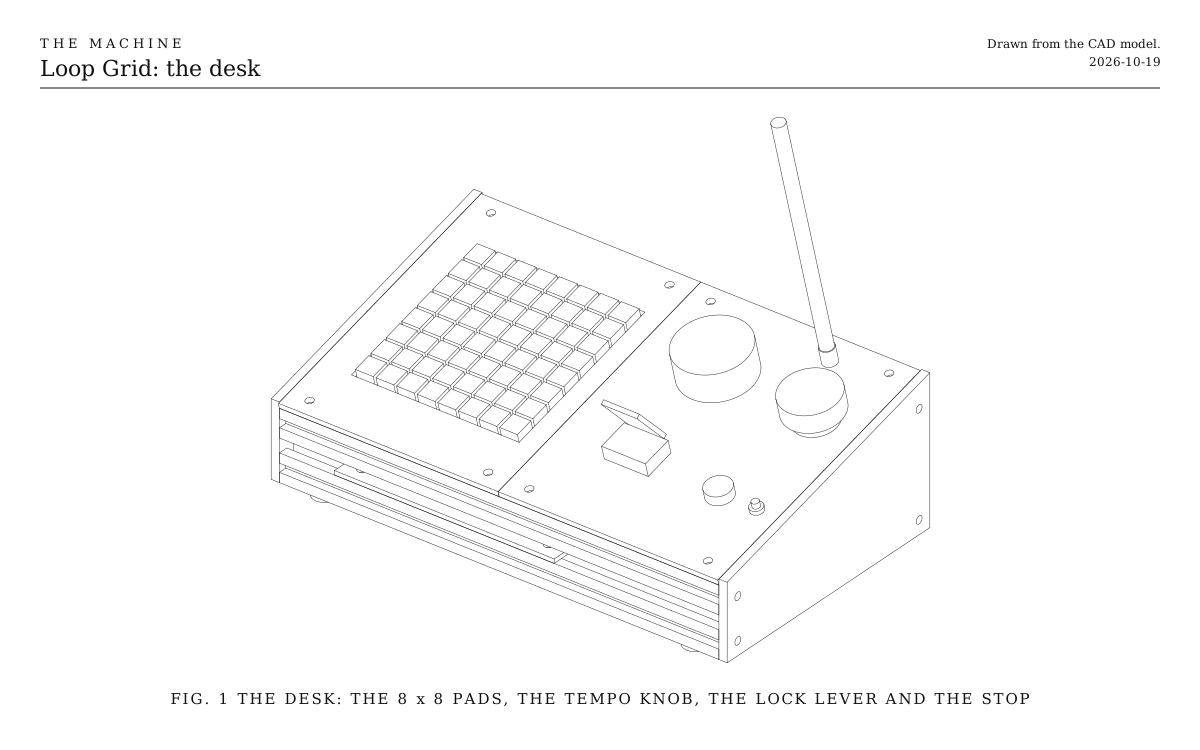
The desk. The 8 x 8 pads, a row for each element and a column for each loop, then the tempo knob, the lock lever and the stop. Drawn from the CAD model.
Fig. 1The desk. The 8 x 8 pads, a row for each element and a column for each loop, then the tempo knob, the lock lever and the stop. Drawn from the CAD model.

How it works

  • One row of pads for each element, one column for each loop. Pressing one says “from the next bar line, this element plays this loop.”
  • The master tempo glides rather than jumps, and stays within what the slowest locked element can follow, so a turn of the knob reads as a swell, not a stumble.
  • The tempo only steers locked elements; free ones keep their own time. The lever under its cover throws the focus lock, pulling everything onto the shared beat.
  • The pads light up to show what was asked. They can’t show whether an element is on stage, since elements never answer: a lit pad over a missing element is silence.
  • Whoever plays it is a performer, not a technician.
  • The bridge’s board, stop button, activate button, light and antenna are built into the desk.

Parts

Ingredients

KindPartQtyEachFile
PrintedPanel, left tile, with the window for the padsYour choice: see The panel1·STL
PrintedPanel, right tile, for the knob, the lever and the stopYour choice: see The panel1·STL
PrintedCheek, left1·STL
PrintedCheek, right1·STL
PrintedTray for the electronics1·STL
Bought2020 V-slot extrusion, 320 mmThe four rails across the desk. Cut square, so the cheeks sit flat.4$3.50
BoughtThe bridge's parts, without its boxEverything on the Bridge's parts list except the printed box: the ESP32-S3 board, antenna and lead, stop button, activate button, light, resistors and cable.1$45.00
BoughtNeoTrellis 4 x 4 boards, with lights under every keyYour choice: see The padsSide by side, two by two, they make the 8 x 8 grid. They talk to the board on two wires.4$12.50
BoughtSilicone 4 x 4 key pads, to fit the boardsYour choice: see The pads4$6.00
BoughtRotary encoder, 7 mm shaft, with a push switchYour choice: see The tempo control1$1.50
BoughtKnob, about 50 mm acrossYour choice: see The tempo control1$5.00
BoughtToggle switch, 12 mm thread, with a flip-up safety coverThe lock lever. The cover makes it something you mean to throw.1$4.00
BoughtM5 x 16 screwsThrough the cheeks into the rails' tapped ends.8$0.30
BoughtM5 x 10 screws and T-nutsThe panel tiles and the tray onto the rails.12$0.30
BoughtStick-on rubber feet4$0.25
Total$150.50

Tools

  • A computer with USB, and the Arduino environment for ESP32
  • 3D printer, PETG
  • M5 tap, for the rails' ends
  • Hex keys, 2.5 and 3 mm
  • Soldering iron
  • Multimeter

Choices

Decisions that are yours to make. Where we started is the version in the 3D model and the ingredients: a starting point, not the right answer.

The pads

What does the grid feel like?

Silicone pads, lit from belowWhere we started

Soft, quiet keys that glow in any colour, so a column can show its loop and a row its element. Four boards, one window in the panel.

64 arcade buttons, 24 mm

Clicky and solid, each one a real button. The desk grows to about 400 mm square, and 64 buttons to wire.

A bought grid controller

An off-the-shelf pad controller plugged into the bridge's USB, with the knob, lever and stop in a smaller desk beside it. No grid to build, and less to see of the making.

The tempo control

How is the master tempo set?

A big knobWhere we started

Turned slowly for a swell, pushed to snap back to the piece's own tempo. The gesture reads from the back of the room.

A long slider

A 100 mm fader, where the tempo's place is always visible. Wants a longer slot in the panel.

A tap button

Tap the beat and the ensemble follows, with a glide. Tempo by feel rather than by number.

The panel

What is the top made of?

Two printed tilesWhere we started

In the same orange as every printed part, and any change to the layout is a new print.

One sheet of plywood

A single 6 mm sheet, cut and drilled to the tiles' outline. Warm and plain, no seam.

Aluminum sheet

2 mm, drilled, with a square cut-out for the pads. Looks like test equipment.

Print

Material
PETG
Layers
0.2 mm
Walls
4
Infill
25%

Every part prints flat and fits a 220 mm bed. The pads' window is 122 mm square, a millimetre of play around four 60 mm boards; check yours before printing.

The printed parts

  • Panel, left tile, with the window for the pads

    Which way up
    Top face down
    Supports
    None
    Time
    About 4 hours
    STL ↓
  • Panel, right tile, for the knob, the lever and the stop

    Which way up
    Top face down
    Supports
    None
    Time
    About 8 hours
    STL ↓
  • Cheek, left

    Which way up
    Flat on its outside face
    Supports
    None
    Time
    About 6 hours
    STL ↓
  • Cheek, right

    Which way up
    Flat on its outside face
    Supports
    None
    Time
    About 6 hours
    STL ↓
  • Tray for the electronics

    Which way up
    Flat
    Supports
    None
    Time
    About 6 hours
    STL ↓

Assembly

  1. 1

    Bridge the address jumpers on three of the four pad boards, so each answers to its own number.

    TrickyLeave the first board as it comes, bridge A0 on the second, A1 on the third, and both on the fourth. Two boards with the same number make the grid light the wrong keys.

  2. 2

    Tap the centre hole at both ends of each rail M5.

    TrickyGo straight and slowly, backing the tap out every turn. A crooked thread tilts the cheek and the whole desk twists.

  3. 3

    Slide two T-nuts into the top slot of each top rail, and two into each bottom rail for the tray.

    TrickyT-nuts can't get into a slot once both cheeks are on, so put them all in now.

  4. 4

    Screw the four rails to the left cheek, then the right, with the M5 x 16 screws.

    CheckThe desk stands without rocking.

  5. 5

    Screw the tray onto the bottom rails, and strap the board to it with a zip tie.

  6. 6

    Fit the encoder, the lever, the stop button, the activate button and the light holder to the right tile, and bolt the antenna connector through its hole. Push the knob onto the encoder.

  7. 7

    Lay the four pad boards face up under the window, two by two, with the silicone pads through it, and hold them with a few dots of hot glue at the boards' edges.

    CheckEvery key moves freely and none rubs on the window's edge.

  8. 8

    Wire everything as in the Wiring tab.

    CheckWith the pads powered, SDA reads about 3.3 V to ground, never 5.

  9. 9

    Screw the two tiles onto the top rails, plug the USB cable into the board's port marked USB, and stick the feet under the bottom rails.

    CheckWith the bridge's firmware loaded, the light is solid red when it's switched on, as the bridge always starts.

Wiring

The stop button, activate button, light and antenna are wired exactly as on the Bridge, to the same pins. Here are the Loop Grid's own parts: the four pad boards share two data wires, and the knob and lever take one or two pins each. The board runs from its USB cable.

Wiring · Loop Grid
PowerSignalGround, all joinedPins drawn faint are left empty.

Wire list

  1. ESP32-S3 board, 3V3

    Pad boards, four, chained, VIN

    Power22 AWG

    Into the first board; the boards pass power, ground and data along to each other through their edge connectors.

  2. ESP32-S3 board, GPIO 8

    Pad boards, four, chained, SDA

    SignalAny hookup wire

  3. ESP32-S3 board, GPIO 9

    Pad boards, four, chained, SCL

    SignalAny hookup wire

  4. ESP32-S3 board, GND

    Pad boards, four, chained, GND

    Ground22 AWG

  5. ESP32-S3 board, GPIO 10

    Tempo encoder, A

    SignalAny hookup wire

  6. ESP32-S3 board, GPIO 11

    Tempo encoder, B

    SignalAny hookup wire

  7. ESP32-S3 board, GND

    Tempo encoder, Common

    GroundAny hookup wire

    The middle pin of the three on one side.

  8. ESP32-S3 board, GPIO 12

    Tempo encoder, Push

    SignalAny hookup wire

    Pushing the knob snaps the tempo back to the piece's own.

  9. ESP32-S3 board, GND

    Tempo encoder, Push common

    GroundAny hookup wire

  10. ESP32-S3 board, GPIO 13

    Lock lever, toggle switch, 1

    SignalAny hookup wire

  11. ESP32-S3 board, GND

    Lock lever, toggle switch, 2

    GroundAny hookup wire

Get these right

Power the pads from 3.3 V, not 5
Their data lines connect straight to the ESP32's pins, and 5 V on those pins destroys them. Check with a multimeter before connecting the data wires.
Keep the lights dim
Sixty-four lights at full brightness draw more than the board's 3.3 V supply can give. Set them to a quarter or less; on a dark stage that's still plenty.

Mounting

The Loop Grid is a slanted desk that stands on a table: four 2020 rails between two printed cheeks, with the panel on the top two rails and the board on a tray across the bottom two.

The rails
M5 x 16 screws through each cheek into the rails' tapped ends, four to a cheek.
The panel tiles
Two M5 x 10 screws each into T-nuts in the top slots of the two upper rails. The seam runs between the pads and the controls.
The pad boards
Hot glue at their edges, under the window, so the keys stand through it.
The tray
Four M5 x 10 screws into T-nuts in the two bottom rails, under the pads.
The feet
Four stick-on rubber feet under the bottom rails.

Where it plays

Facing the performer, or the audience?

On a table, facing the performerWhere we started

Like any instrument's controller. The audience sees the performer's hands, not the grid.

Up on a stand, facing out

On a 20 mm extrusion stand at chest height, tilted toward the room, so the lit grid is part of what's seen. The performer reaches over the top.

Tuning

Tuning

The tempo's glide
Start with a change taking a full bar to arrive. Listen to the slowest locked element, a pendulum or a windmill; if it stumbles, slow the glide until it follows.
The lights
A loop that's asked for glows dimly; the one playing now brighter. Turn both down until the grid reads at a glance without lighting the performer's face.

Variations

Bought or built
Off-the-shelf grid controllers with pads and faders plug into the bridge's USB. A hand-built console with real buttons and a big tempo dial becomes something the audience watches.
Songs on the grid
One row of the grid recalls whole pieces, as a set list does, so a performance can move between written and improvised.
More elements
A third pair of pad boards makes 12 rows by 8 loops. The desk grows to about 380 mm deep, and the window with it.