Skip to content

The Machine · Control

Switchboard

Design stage

Updated 2026-10-19

Patch cords between elements and loops, like an old telephone exchange, for an installation that visitors play.

Loading the model

Drag to turn · scroll to zoom

Printed

3DThe Switchboard. Printed parts are drawn in orange; everything else is bought. The bridge box sits behind, on the right foot.

Overview

Cost, roughly
About $130
Printing
About 45 hours, in four prints
Building
A weekend, most of it wiring
Difficulty
Involved
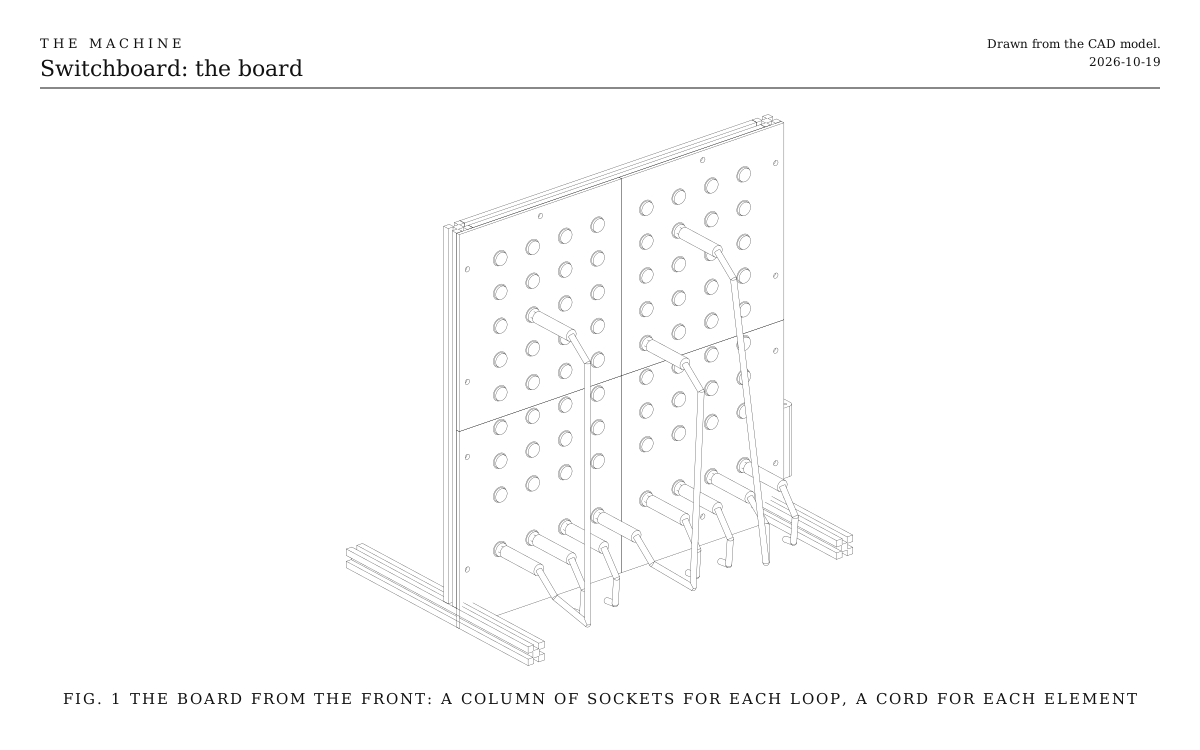
The board. Eight columns of sockets, one for each loop, and along the bottom a socket and a cord for each element. Drawn from the CAD model.
Fig. 1The board. Eight columns of sockets, one for each loop, and along the bottom a socket and a cord for each element. Drawn from the CAD model.

How it works

  • Eight columns of sockets, one for each loop, and along the bottom a socket and a cord for each element. A cord plugged into “column 3” sets that element’s next bar to loop 3.
  • It’s slow and very visible: the cords themselves show what the ensemble is doing.
  • Visitors only ever change rhythms. The tempo, the lock and the stop stay with whoever looks after the installation, at the bridge box behind the board.
  • Several cords can share a column, so the whole ensemble can play one loop.

Parts

Ingredients

KindPartQtyEachFile
PrintedPanel tile, lower leftYour choice: see The panel1·STL
PrintedPanel tile, lower rightYour choice: see The panel1·STL
PrintedPanel tile, upper leftYour choice: see The panel1·STL
PrintedPanel tile, upper rightYour choice: see The panel1·STL
FabricatedThe Bridge, built in its boxIts own recipe. It sits on the right foot, behind the panel, where only whoever looks after the installation reaches its stop.1·
Bought2020 V-slot extrusion, 280 mmThe feet, front to back.2$3.00
Bought2020 V-slot extrusion, 400 mmThe side uprights.2$4.00
Bought2020 V-slot extrusion, 360 mmThe top and bottom bars, and the middle upright the tiles meet on.3$3.50
BoughtCorner brackets for 20 mm extrusion10$0.50
BoughtM5 x 10 screws and T-nutsFor the brackets, the tiles and the bridge box.34$0.30
Bought1/4 inch mono panel socketsYour choice: see The sockets and cordsSixty-four for the loops, eight for the elements.72$0.80
Bought1/4 inch patch cords, about 1 mYour choice: see The sockets and cordsGuitar patch cables. One for each element.8$3.00
BoughtMCP23017 I/O expander boardGoes inside the bridge box, beside the board.1$3.00
BoughtRibbon or multi-core cable, 17 cores, about 1 mFrom the sockets to the bridge box, in through its cable slot.1$4.00
BoughtBare tinned wireDown each column, joining its eight sockets' tips.1$3.00
Total$131.30

Tools

  • 3D printer, PETG
  • Hex keys, 2.5 and 3 mm
  • Soldering iron
  • Wire strippers
  • Multimeter

Choices

Decisions that are yours to make. Where we started is the version in the 3D model and the ingredients: a starting point, not the right answer.

The sockets and cords

What do visitors plug in?

1/4 inch guitar cordsWhere we started

Big, solid plugs that click home and stand a lot of handling. Cheap cords anyone can replace.

3.5 mm cords

Smaller and cheaper, and the board can be half the size. Fiddly for big hands, and the plugs wear sooner.

Banana plugs

Coloured, springy plugs like an old laboratory, one wire each. A different colour for each element reads at a glance.

The panel

What is the face made of?

Four printed tilesWhere we started

In the same orange as every printed part, and any change to the layout is a new print. About 45 hours of printing.

One sheet of plywood

A single 6 mm sheet, drilled. Warm, like a wooden exchange cabinet, no seams, and no printing.

Brass or aluminum sheet

2 mm, drilled and labelled with engraving or stamps. The most like the real thing, and the heaviest.

Where the bridge sits

Behind the board, or with the attendant?

On the right foot, behindWhere we started

One thing to set up, and the stop is a step behind the board, out of visitors' reach.

At the attendant's desk

The bridge box on a desk a few meters off, joined by a longer cable, so whoever looks after the room has the stop at hand all day.

Print

Material
PETG
Layers
0.2 mm
Walls
4
Infill
25%

Each tile is 200 x 210 mm and prints flat. The socket holes are 9.6 mm, for the 3/8 inch thread of a standard 1/4 inch panel socket; check yours before printing.

The printed parts

  • Panel tile, lower left

    Which way up
    Flat, face down
    Supports
    None
    Time
    About 11 hours
    STL ↓
  • Panel tile, lower right

    Which way up
    Flat, face down
    Supports
    None
    Time
    About 11 hours
    STL ↓
  • Panel tile, upper left

    Which way up
    Flat, face down
    Supports
    None
    Time
    About 11 hours
    STL ↓
  • Panel tile, upper right

    Which way up
    Flat, face down
    Supports
    None
    Time
    About 11 hours
    STL ↓

Assembly

  1. 1

    Build the frame. Stand the two side uprights on the feet, then fit the bottom bar, the top bar and the middle upright between them, all with corner brackets.

    CheckThe frame stands square and doesn't rock, and the middle upright is centred.

  2. 2

    Push the 72 sockets through the four tiles, eight to a column and eight along the bottom row, and tighten their nuts on the face.

    TrickyTurn every socket the same way, tip lug up. The column wiring runs straight down the lugs, and a socket turned sideways leaves its lug out of line.

  3. 3

    Run one bare wire down each column, soldered to each of its eight sockets' tip lugs.

    CheckWith a multimeter, every tip in a column connects to every other, and to nothing in the next column.

  4. 4

    Screw the four tiles to the frame with M5 screws into T-nuts in the uprights and bars.

  5. 5

    Screw the bridge box to the top of the right foot, behind the panel, with two M5 screws into T-nuts.

  6. 6

    Wire the expander inside the bridge box, and run the ribbon cable from it to the sockets as in the Wiring tab.

    TrickyLabel both ends of every core as you go. Seventeen cores look alike once they're in the box.

  7. 7

    Plug one end of each patch cord into its element's socket along the bottom row, and hang the free ends below.

    CheckWith a multimeter, each element's tip at the expander end connects to the column its cord is plugged into, and to no other.

Wiring

The bridge is wired as on its own recipe. Here is the Switchboard's own part: the expander, inside the bridge box, sends a signal down each element's cord in turn and listens on the eight loop columns. A cord from element 3 in column 5 means element 3 plays loop 5. The sockets' sleeves connect to nothing.

Wiring · Switchboard
PowerSignalGround, all joinedPins drawn faint are left empty.

Wire list

  1. ESP32-S3 board, in the bridge box, 3V3

    MCP23017 expander, in the bridge box, VCC

    PowerAny hookup wire

  2. ESP32-S3 board, in the bridge box, 3V3

    MCP23017 expander, in the bridge box, RESET

    PowerAny hookup wire

    Held high, or the expander keeps resetting.

  3. ESP32-S3 board, in the bridge box, GND

    MCP23017 expander, in the bridge box, GND

    GroundAny hookup wire

  4. ESP32-S3 board, in the bridge box, GND

    MCP23017 expander, in the bridge box, A0

    GroundAny hookup wire

    A0, A1 and A2 all to ground, for the expander's first address.

  5. ESP32-S3 board, in the bridge box, GND

    MCP23017 expander, in the bridge box, A1

    GroundAny hookup wire

  6. ESP32-S3 board, in the bridge box, GND

    MCP23017 expander, in the bridge box, A2

    GroundAny hookup wire

  7. ESP32-S3 board, in the bridge box, GPIO 8

    MCP23017 expander, in the bridge box, SDA

    SignalAny hookup wire

  8. ESP32-S3 board, in the bridge box, GPIO 9

    MCP23017 expander, in the bridge box, SCL

    SignalAny hookup wire

  9. MCP23017 expander, in the bridge box, GPA0

    Element sockets, along the bottom, Tip 1

    SignalOne core of the ribbon

    GPA1 to GPA7 go to elements 2 to 8 the same way. The expander pulls one element low at a time.

  10. MCP23017 expander, in the bridge box, GPA1

    Element sockets, along the bottom, Tip 2

    Signal

  11. MCP23017 expander, in the bridge box, GPA2

    Element sockets, along the bottom, Tip 3

    Signal

  12. MCP23017 expander, in the bridge box, GPA3

    Element sockets, along the bottom, Tip 4

    Signal

  13. MCP23017 expander, in the bridge box, GPA4

    Element sockets, along the bottom, Tip 5

    Signal

  14. MCP23017 expander, in the bridge box, GPA5

    Element sockets, along the bottom, Tip 6

    Signal

  15. MCP23017 expander, in the bridge box, GPA6

    Element sockets, along the bottom, Tip 7

    Signal

  16. MCP23017 expander, in the bridge box, GPA7

    Element sockets, along the bottom, Tip 8

    Signal

  17. MCP23017 expander, in the bridge box, GPB0

    Loop columns, eight sockets joined in each, Column 1

    SignalOne core of the ribbon, to the column's bare wire

    GPB1 to GPB7 go to columns 2 to 8 the same way. Each column is held high, and reads low when the element being pulled low is plugged into it.

  18. MCP23017 expander, in the bridge box, GPB1

    Loop columns, eight sockets joined in each, Column 2

    Signal

  19. MCP23017 expander, in the bridge box, GPB2

    Loop columns, eight sockets joined in each, Column 3

    Signal

  20. MCP23017 expander, in the bridge box, GPB3

    Loop columns, eight sockets joined in each, Column 4

    Signal

  21. MCP23017 expander, in the bridge box, GPB4

    Loop columns, eight sockets joined in each, Column 5

    Signal

  22. MCP23017 expander, in the bridge box, GPB5

    Loop columns, eight sockets joined in each, Column 6

    Signal

  23. MCP23017 expander, in the bridge box, GPB6

    Loop columns, eight sockets joined in each, Column 7

    Signal

  24. MCP23017 expander, in the bridge box, GPB7

    Loop columns, eight sockets joined in each, Column 8

    Signal

Get these right

Only the tips are wired
The cords join tip to tip; their sleeves carry nothing. Leaving the sleeves unconnected means a visitor touching two plugs can't short anything.
Power the expander from 3.3 V
Its pins connect straight to the ESP32's, which 5 V destroys.

Mounting

The Switchboard stands on the floor, its face to the room. Everything is 2020 extrusion joined with corner brackets, the tiles are screwed to its front, and the bridge box sits on the right foot behind it.

The frame
Two side uprights stand on two feet that run front to back. The bottom and top bars and the middle upright fit between the uprights. Every joint takes two corner brackets.
The tiles
Twelve M5 screws into T-nuts in the front slots of the uprights and bars. The two columns of tiles meet over the middle upright.
The bridge box
On top of the right foot, behind the panel, with two M5 screws through its floor into T-nuts in the foot's top slot. Its lid, stop button and antenna face up.
The ribbon cable
Along the back of the bottom bar to the bridge box, in through its cable slot with the USB cable.
The cords
Each plugged into its element's socket along the bottom, its free end hanging to the floor.

How it stands

On its own feet, or against a wall?

On its feetWhere we started

Freestanding in the room, so visitors can walk round it and see the wiring behind.

Against a wall

Screwed to the wall through the uprights' back slots, with the feet left off. Steadier against a crowd, and the back stays out of sight.

Tuning

Tuning

How long a cord must be in
Start at a third of a second. Visitors fumble; a plug brushed past a column shouldn't count. If changes feel slow to arrive, shorten it.
No cords in
With nothing plugged in, the ensemble can rest, or each element can play a loop of its own. Watch how visitors start; a silent board can look broken.

Variations

Tokens in slots
A wooden block for each loop, dropped into an element's slot. The console reads which block is where, and setting one down is its own small gesture.
Cords that retract
Each cord runs down through the shelf over a pulley to a small weight, as on old exchanges, so a cord pulled out slides back home on its own.
More elements
Each more element is one more socket along the bottom and one more cord. Past eight, a second expander on the same two wires adds eight more.